Proof of value (POV) process for C#
Before starting the PoV process, make sure your team has completed the prerequisites checklist.
Moderne automates code maintenance tasks like framework migrations, security vulnerability fixes, and code quality improvements. Work that traditionally takes months can be completed in minutes, freeing developers to focus on delivering business value.
This guide walks through a typical proof of value (POV) process to help you evaluate Moderne's capabilities against your .NET codebase. To demonstrate Moderne's value, we start with lower-complexity tasks like code quality improvements and then explore what happens with more complex migrations. It's important to note that we won't try to complete an entire migration during the proof of value phase. The goal is to demonstrate to you and your leadership that your developers, armed with the Moderne toolset (the CLI and Platform), can get you all the way over the line. This applies not just to a specific migration, but to all future security and modernization efforts.
Moderne's value lies in working horizontally across all of your repositories simultaneously. Consider a modernization task that needs to happen across 125 repositories:
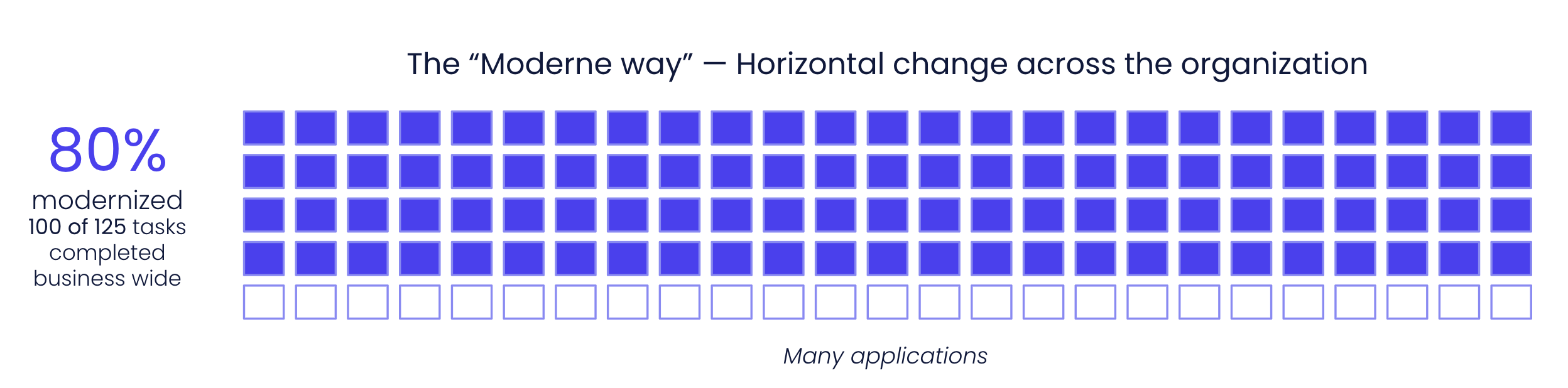
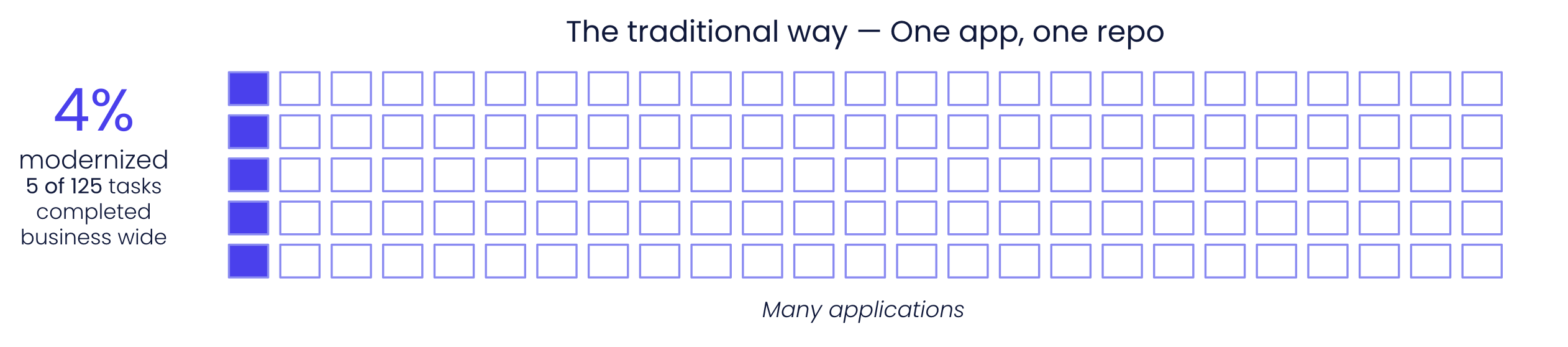
This is why we focus on Moderne's multi-repo capabilities during the proof of value process. Rather than trying to get any single repository perfectly over the line, we demonstrate the power of applying changes across your entire codebase at once.
During the proof of value process, we will teach you how to use building block recipes as well as how to develop your own custom recipes that will start to bridge the remaining 20% gap. After the proof of value process, we will continue to work with you to get that last 20% over the line.
Proof of value steps
- Moderne Platform
- Moderne CLI
-
Platform provisioning - Moderne provisions an isolated platform in your chosen cloud provider and region (takes ~1 hour).
-
Mass Ingest - Your team sets up an ingestion pipeline to build and publish LST artifacts for your .NET repositories. You should start with 100 or more diverse repositories for best results. This step does not require you to make any changes to the repositories themselves.
-
Connector setup - Your team sets up the Moderne Connector following our Connector configuration doc. The Connector runs as a Docker image or JAR and connects to your source code manager (SCM) and artifact repository using read-only service accounts (takes less than 1 hour with accounts ready).
-
Run recipes - With everything set up, you can now run recipes against your code. We strongly recommend starting with simple code quality improvement recipes before progressing to complex migrations. You can find our recommended recipes to run and examples of what they do in the next section of this doc.
-
Study results - After you've run a recipe, you should generate data tables and visualizations to learn more about what happened.
The recipes below progress from simple to complex. Links go to the public Moderne Platform where you can test on open-source repositories. You can also run these recipes using the CLI commands provided in each section.
-
Install the Moderne CLI – Follow the installation steps in the CLI documentation to install the CLI for your platform.
- Note: You may experience a few speed bumps related to your internal nexus/scanners that block recipes JARs. Ideally this is not an issue, but if it is, please let us know, and we'll work together with you to address it.
-
Install the .NET SDK – The CLI uses
dotnetto restore and parse C# projects, so a few things need to be in place:- Install .NET 10 or later. The C# recipe runtime (
rewrite-csharp) ships as anet10.0application, so .NET 8 and 9 will not work. Verify your install withdotnet --version. - Let the CLI find your SDK. It selects the SDK automatically from
$PATH, or you can configure it explicitly withmod config dotnet installation edit. - Use CLI v4.5.0 or later. These versions parse C# by default. On older versions, you will need to add the .NET build step manually.
- For the full walkthrough, including registering a non-standard SDK location and raising the build timeout for large solutions, see our C# configuration guide.
- Install .NET 10 or later. The C# recipe runtime (
-
Clone repos to your local machine – In order for the CLI to run recipes against your code, you will need to provide it with a repos.csv file.
-
Once you've created the
repos.csvfile, create a directory somewhere on your machine and run the following command:mod git sync csv . repos.csv --with-sources
-
-
Build LSTs for the repos you cloned – With all of the repositories cloned to your machine, you'll need to build the LSTs for them by running the following command:
mod build .- Note: All of your LSTs may not build successfully. This is a normal experience during initial ingestion as there are always unique configurations and environmental factors that need to be accounted for. We can work with you to investigate these issues on a call.
-
The CLI stack trace will give some hints as to the issue. There is also a
build.logfile produced to every repo that will contain more context. You can also run the following command to aggregate the build logs:mod log builds add . logs.zip --last-build -
Common reasons C# LSTs may fail to build:
- Solutions that pin an SDK version in
global.jsonthat is not installed locally - Projects targeting preview or unreleased .NET SDKs
- Solutions whose
dotnet restorerequires private NuGet feeds that are not configured on the build machine - Solutions that contain multiple top-level project files at the root (the build invokes
dotnet restore <solution>and cannot disambiguate*.slnvs.*.slnx)
- Solutions that pin an SDK version in
-
- Note: All of your LSTs may not build successfully. This is a normal experience during initial ingestion as there are always unique configurations and environmental factors that need to be accounted for. We can work with you to investigate these issues on a call.
-
Add your CLI key – By now, you should have received a CLI key for the purposes of this PoC. Run the following command to add the key, which will allow you to download and run recipes:
mod config license edit <insert provided key here> -
Install the recipes – Copy and run the Moderne CLI command under CLI installation.
- The C# code quality and .NET migration recipes are distributed separately as NuGet packages. Install them with
mod config recipes nuget install, following Install recipes in the C# configuration guide.
- The C# code quality and .NET migration recipes are distributed separately as NuGet packages. Install them with
-
Try your first recipe – Try a simple recipe to test that you can execute successfully against the LSTs you built in step 4. We recommend the C# code quality recipe, which will apply a curated set of code quality improvements across your repos. To run this recipe, run the following command:
mod run . --recipe OpenRewrite.Recipes.CSharp.CodeQuality.CodeQuality
Code quality recipes
C# code quality
Applies a curated set of C# code quality improvements covering formatting, naming, simplification, performance, and style. This is the recommended starting point for a C# PoV.
CLI commands
mod run . --recipe OpenRewrite.Recipes.CSharp.CodeQuality.CodeQuality
mod study . --last-recipe-run --data-table SourcesFileResults
Code search and impact analysis
Many developers use Moderne every day for code search. Need to plan a refactor? Want to understand how an API is used? Trying to assess security concerns? All of these questions can be answered by running search recipes across your repositories.
This is possible because Moderne treats your code like a data warehouse. Our search capabilities go far beyond simple text searches. They understand your code's structure, inheritance hierarchies, and semantic relationships. It's effectively like running a database query across your entire codebase.
One of the most powerful applications of search is impact analysis – understanding what will be affected before you make changes. The search recipes below help you assess the scope and impact of potential transformations, giving you confidence before running large-scale refactors or migrations.
Find call graph
Produces a data table where each row represents a method call. Works across languages, including C#.
CLI commands
mod run . --recipe org.openrewrite.FindCallGraph
mod study . --last-recipe-run --data-table CallGraph
Find blocking calls in async methods
Locates synchronous blocking calls (
.Wait(),.Result, and.GetAwaiter().GetResult()) insideasyncmethods. Useful for triaging async hygiene issues at scale before a performance or stability push.
CLI commands
mod run . --recipe OpenRewrite.Recipes.CSharp.CodeQuality.Performance.FindBlockingCallsInAsync
mod study . --last-recipe-run --data-table SourcesFileResults
Find methods that could be static
Identifies instance methods that don't reference
thisand could be declaredstatic. A lightweight search recipe to demonstrate type-aware impact analysis on C# code.
CLI commands
mod run . --recipe OpenRewrite.Recipes.CSharp.CodeQuality.Performance.FindMakeMethodStatic
mod study . --last-recipe-run --data-table SourcesFileResults
Find TODO/HACK/FIXME comments
Surfaces every TODO, HACK, and FIXME comment across your C# codebase. Useful for sizing technical debt before planning a remediation effort.
CLI commands
mod run . --recipe OpenRewrite.Recipes.CSharp.CodeQuality.Naming.FindFixTodoComment
mod study . --last-recipe-run --data-table SourcesFileResults
DevCenter
A DevCenter gives you a high-level, single-page overview of where every repository in your organization stands. The default C# configuration tracks .NET version adoption and reports organization statistics like repository counts, contributing developers, and lines of code. This makes it an effective way to frame a proof of value for leadership before diving into individual recipes.
There are two ways to view a DevCenter:
- In the Moderne Platform – organizations configured with a DevCenter display it via the
DevCenterlink in the left navigation. See Understanding the Moderne DevCenter for a walkthrough of each component. - Locally with the CLI – you can generate an HTML dashboard for any set of repositories you have cloned and built. See Generating DevCenters locally for the full guide.
DevCenter for C#
A default DevCenter configuration for C# repositories that tracks .NET version adoption across your organization, along with organization statistics like repository counts, contributing developers, and lines of code.
CLI commands
# Install the DevCenter recipes
mod config recipes jar install io.moderne.recipe:rewrite-devcenter:LATEST

# Run the C# DevCenter starter to produce the required data tables
mod run . --recipe io.moderne.devcenter.DevCenterCSharpStarter

# Generate the HTML DevCenter dashboard
mod devcenter . --last-recipe-run
Recipe results
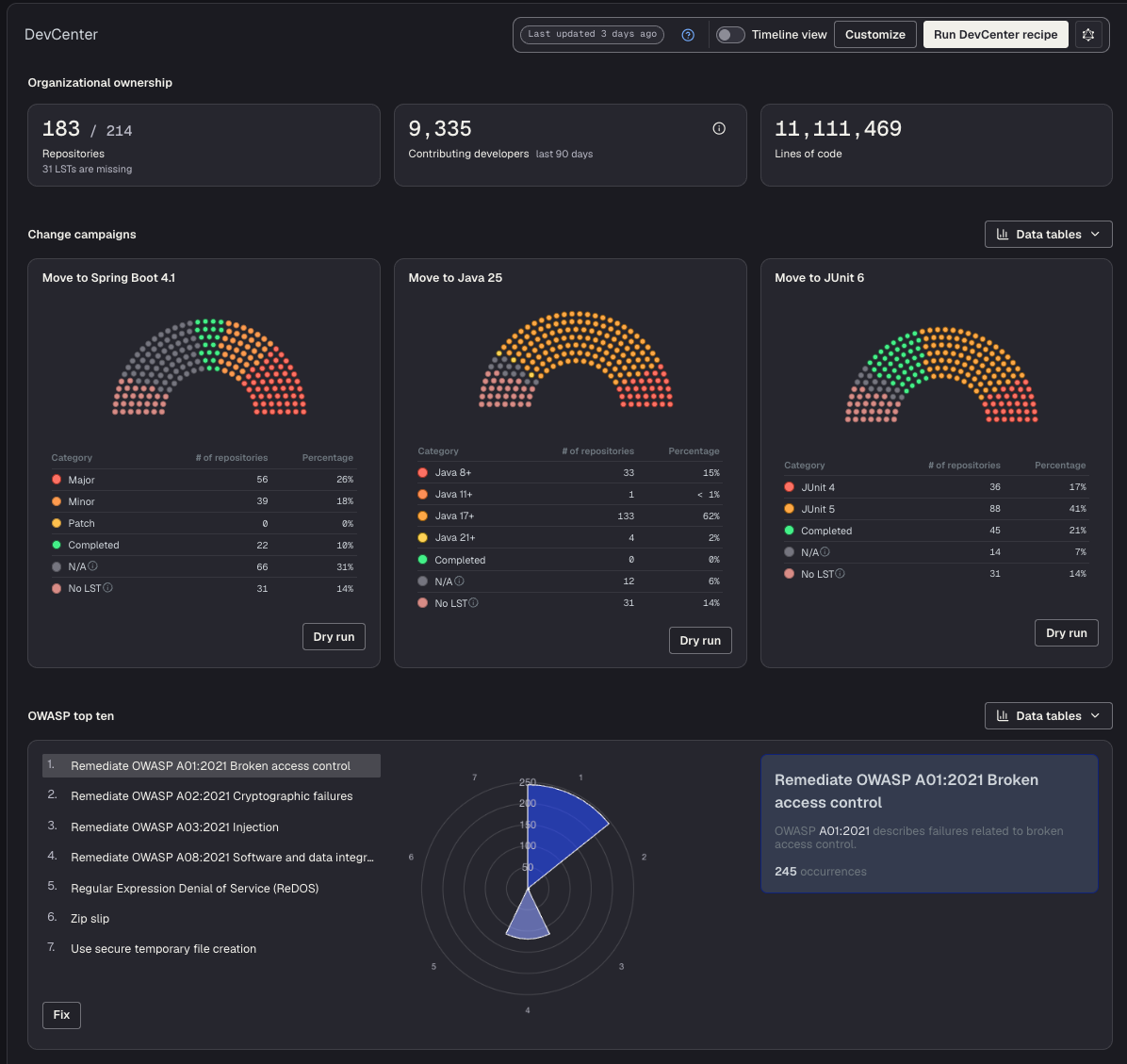
DevCenterCSharpStarter is the default C# configuration. DevCenters are available for many other ecosystems too, including Java, Python, Node.js, Angular, Kotlin, Quarkus, and Apache Maven. Browse the full set in the DevCenter recipe catalog, or learn how to create a custom DevCenter recipe.
Dependency management
Dependency insight for C#
Finds NuGet dependencies (including transitive) across your .NET projects. Useful for identifying version inconsistencies that can cause runtime issues.
CLI commands
# Example: find every Newtonsoft.* dependency in use
mod run . --recipe org.openrewrite.csharp.dependencies.DependencyInsight \
  -P "packagePattern=Newtonsoft*"

mod study . --last-recipe-run --data-table DependenciesInUse
Upgrade NuGet package version
Upgrades a NuGet package to a specific version or to the latest available version.
CLI commands
mod run . --recipe OpenRewrite.CSharp.Recipes.UpgradeNuGetPackageVersion \
  -P "PackageName=Newtonsoft.Json" \
  -P "NewVersion=latest"

mod study . --last-recipe-run --data-table SourcesFileResults
Security
Find and fix vulnerable NuGet dependencies
Software composition analysis (SCA) tool that detects and upgrades NuGet dependencies with known CVEs. Uses the GitHub Security Advisory Database, which aggregates multiple vulnerability databases including the National Vulnerability Database.
CLI commands
mod run . --recipe org.openrewrite.csharp.dependencies.DependencyVulnerabilityCheck
mod study . --last-recipe-run --data-table SourcesFileResults
Major migrations
Major migrations are complex transformations that typically automate 80-90% of the work, with the remainder requiring manual developer intervention. They are typically composed of multiple, complex recipes.
Migrate to .NET 10
Comprehensive migration to .NET 10. Updates target frameworks, replaces deprecated APIs, adopts new language features, and upgrades NuGet packages to .NET 10 compatible versions. Earlier migrations (
UpgradeToDotNet8,UpgradeToDotNet9, etc.) are also available if you need a smaller jump.
CLI commands
mod run . --recipe OpenRewrite.Recipes.CSharp.Migration.Dotnet.Net10.UpgradeToDotNet10
mod study . --last-recipe-run --data-table SourcesFileResults
AI agent context
AI coding agents like Claude Code, Cursor, and GitHub Copilot work better when they have structured knowledge about your codebase rather than inferring architecture from raw code. Prethink generates this context automatically, mapping service endpoints, dependencies, test coverage, and architecture so agents reason over facts instead of guessing. To learn more, please check out our Prethink documentation.
Update Prethink context
Generates Prethink context files with architectural discovery, dependency inventory, and architecture diagrams. Works for C# projects.
CLI commands
mod run . --recipe io.moderne.prethink.UpdatePrethinkContextStarter

mod git apply . --last-recipe-run