Remote Moderne MCP server
The Moderne Platform hosts a remote Model Context Protocol (MCP) server that gives AI coding agents access to your platform's recipes and recipe results. Unlike the local MCP server, which runs on your workstation and operates on repositories you have checked out, the remote server runs on the platform and operates on the repositories already ingested into your tenant.
The remote MCP server is in beta. Tools will be added, reshaped, and occasionally removed as we learn how agents use them. That being said, it's only the tools themselves that are in beta - not the platform underneath it. Authentication and access scoping work exactly as they do for the rest of the Moderne API (as described under Security.
None of the changes to the tools requires anything from you, because your agents reads the current list of tools from the server each time it connects.
This page covers when to use the remote server, how to connect your coding agents to it, how to try it out via the MCP explorer, how it authenticates and scopes access, and the tools it provides.
Local vs remote
Moderne offers two MCP servers, and they complement each other:
| Local MCP server | Remote MCP server | |
|---|---|---|
| Maturity | Experimental | Beta |
| Where it runs | On your workstation, as a subprocess of your coding agent | On the Moderne Platform |
| What it operates on | Repositories checked out locally | Repositories ingested into your tenant, scoped by organization |
| Setup | mod config agent-tools install | Point your agent at a URL with an access token (below) |
| Transport | stdio (local subprocess) | Streamable HTTP (remote) |
| Best for | Semantic search, navigation, and refactoring of code you are editing | Running recipes and analyzing results at an organization scale |
For semantic code intelligence on the repository in front of you, use the local server. To run recipes and explore their results across an entire organization without checking the repositories out, use the remote server.
Before you begin
In order to authenticate with the Moderne MCP server, you will need to use a Moderne personal access token. The remote MCP server authenticates with the same token you would use for the Moderne API, so if you already have one, you can reuse it. Otherwise, you can create a new access token.
The token carries the same permissions as your account, so an agent that uses it can only act on the organizations and repositories you can already access.
Connecting your agent
Your coding agent can't use Moderne's recipes or results until it knows the remote server exists. Connecting it registers the server's tools with the agent, so you can ask, in plain language, to find a recipe, run it across an organization, and explore the results - without leaving your editor or opening the platform. You only need to do this once per agent. Afterwards, the tools are available in every session.
Whichever agent you use, register the remote server as a streamable HTTP MCP server at https://api.<tenant>.moderne.io/mcp with two headers:
Authorization: Bearer <your-moderne-access-token>X-Moderne-Platform-Version: v2- This is required while you have SaaS v1 running in parallel with SaaS v2.
Don't forget to replace <tenant> with your tenant's subdomain.
If you want to connect to the public Moderne instance, please use the following URL: https://api.app.moderne.io/mcp.
- Claude Code
- Gemini CLI
- GitHub Copilot CLI
claude mcp add --scope user --transport http modernesaasv2 https://api.<tenant>.moderne.io/mcp \
  --header "Authorization: Bearer <your-moderne-access-token>" \
  --header "X-Moderne-Platform-Version: v2"
Verify the connection with claude mcp list, or run /mcp inside a session to see the server and its tools.
gemini mcp add --transport http -s user modernesaasv2 https://api.<tenant>.moderne.io/mcp \
  -H "Authorization: Bearer <your-moderne-access-token>" \
  -H "X-Moderne-Platform-Version: v2"
Verify the connection with gemini mcp list.
copilot mcp add --transport http \
  --header "Authorization: Bearer <your-moderne-access-token>" \
  --header "X-Moderne-Platform-Version: v2" \
  modernesaasv2 https://api.<tenant>.moderne.io/mcp
Verify the connection with copilot mcp list.
Any coding agent that supports remote MCP servers with custom request headers can connect using the same URL and the two headers above. The configuration steps vary by client, so consult your agent's MCP documentation for the exact syntax.
Example prompts
Once your agent is connected, you don't need to explicitly call the tools by name. Instead, you can describe what you want in plain language. The agent will then pick the right Moderne tool and fill in its parameters. You can mention Moderne in your request to help nudge the agent towards these tools, though. Below are some example prompts of how to interact with your agent:
- "Find me a recipe to upgrade my repositories to the latest version of Spring Boot."
- "What options does that recipe take, and what data tables does it produce?"
- "Use the Moderne MCP to find all the places the
java.util.Listtype is used across the Default organization." - "Run the unused-imports cleanup recipe across my cool cats organization, then tell me which repositories changed the most."
Because most tools run against an organization, the agent may ask which one to use when you haven't named it. See choosing an organization for how to identify yours.
Trying it in the MCP explorer
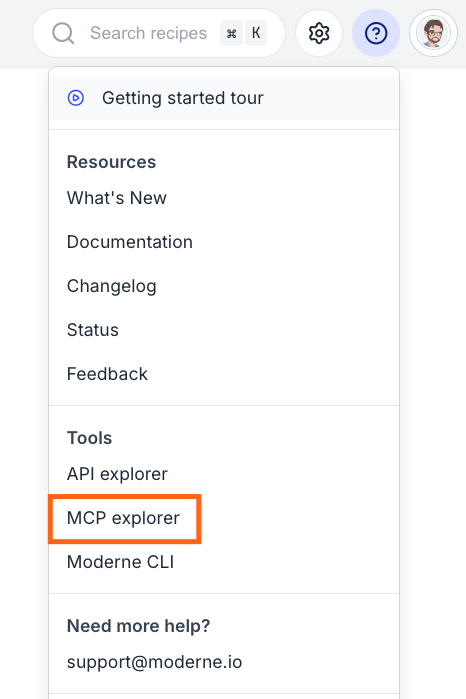
If you want to browse the available tools or test a call without configuring an agent, use the MCP explorer built into the Moderne Platform. Click the help icon (?) in the top-right corner and select MCP explorer under Tools:
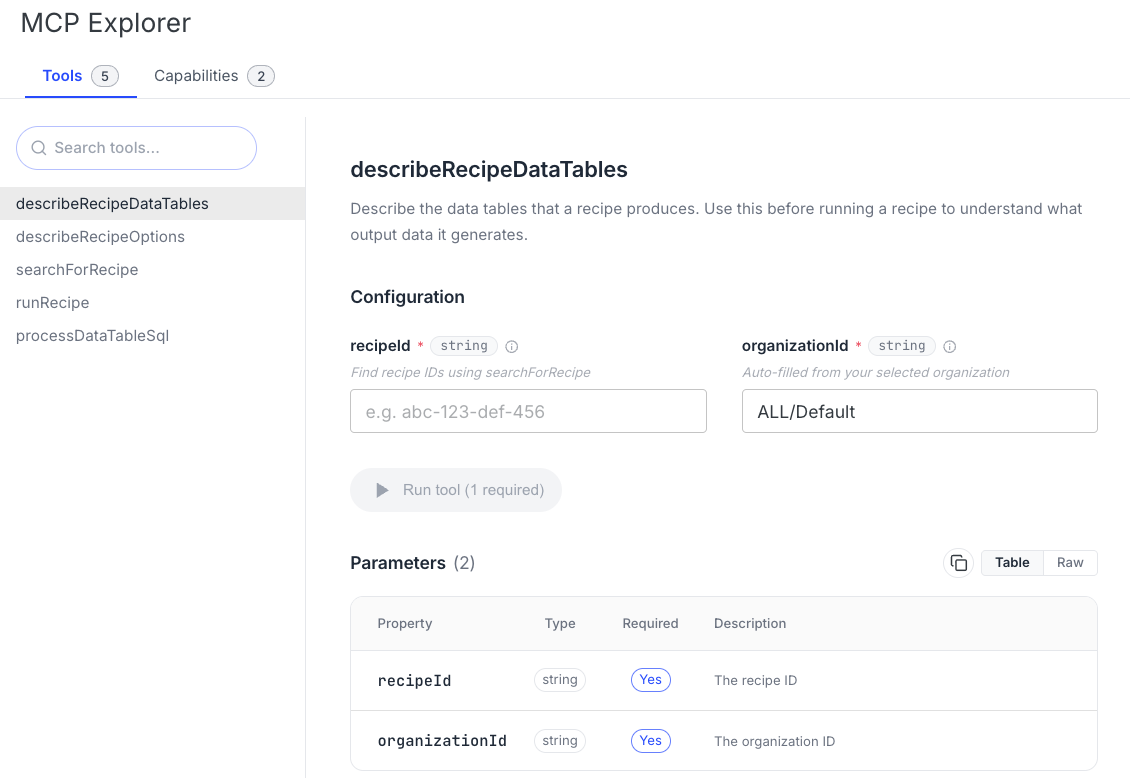
The explorer lists the server's tools and lets you fill in each tool's parameters and run it, with the response shown inline. It is the quickest way to confirm your account can reach the server and to see what each tool returns:
Choosing an organization
Repositories are ingested into your tenant, and an organization is a grouping of those repositories defined in the platform (the same repository can belong to more than one). Most of the remote tools run against a single organization, which you choose by passing an organizationId parameter. In the MCP explorer, this is filled in automatically from the organization you have selected in the platform. A headless agent has no selected organization, so you will need to tell it which one to use.
You can identify an organization by its ID, its path (for example, ALL/Default), or its name (for example, My Test Organization). You can find these in the organization selector in the platform, or by querying the organizations field of the Moderne API.
Recipe runs are not allowed against the root organization (ALL). Pass a specific sub-organization to runRecipe.
Available tools
| Tool | Description |
|---|---|
searchForRecipe | Searches the platform's recipe catalog via a natural-language query and returns the matching recipes for an organization. |
describeRecipeOptions | Returns the configurable options a specific recipe accepts. Use it before running a recipe to understand what parameters it takes. |
describeRecipeDataTables | Returns the data tables a specific recipe produces. Use it before running a recipe to understand what output it generates. |
runRecipe | Runs a recipe across an organization's repositories and returns a preview of the resulting data tables. |
processDataTableSql | Runs SQL against the data tables produced by a recipe run, identified by its run ID. |
A typical flow is to find a recipe with searchForRecipe, inspect it with describeRecipeOptions and describeRecipeDataTables, run it with runRecipe, and then query the results with processDataTableSql. A recipe run can take a little time, so your agent waits for it to finish before returning the results.
Tool schemas
Below is the input schema for each tool. Your agent reads the same schemas when it connects, so this is what it fills in for you when you ask for something in plain language. It is also what you would code against in a client of your own. If you'd rather use a UI to run the tools, check out our MCP explorer.
Every tool that takes an organizationId accepts the organization's ID, path, or name, as described in choosing an organization.
searchForRecipe
Searches the marketplace for recipes matching a natural-language query, scoped to one organization.
{
  "type": "object",
  "properties": {
    "query": { "type": "string", "description": "The search query" },
    "organizationId": { "type": "string", "description": "The organization ID to search within" }
  },
  "required": ["query", "organizationId"]
}
describeRecipeOptions
Returns the options a recipe accepts, including each option's type, description, and whether it is required.
{
  "type": "object",
  "properties": {
    "recipeId": { "type": "string", "description": "The recipe ID" },
    "organizationId": { "type": "string", "description": "The organization ID" }
  },
  "required": ["recipeId", "organizationId"]
}
describeRecipeDataTables
Returns the data tables a recipe produces, along with the columns in each one. The input schema is identical to describeRecipeOptions.
{
  "type": "object",
  "properties": {
    "recipeId": { "type": "string", "description": "The recipe ID" },
    "organizationId": { "type": "string", "description": "The organization ID" }
  },
  "required": ["recipeId", "organizationId"]
}
runRecipe
Runs a recipe across an organization's repositories and, once the run finishes, returns a preview of the first requested data table.
{
  "type": "object",
  "properties": {
    "recipeId": { "type": "string", "description": "The recipe ID to run" },
    "organizationId": { "type": "string", "description": "The organization ID to run against" },
    "dataTableNames": {
      "type": "array",
      "items": { "type": "string" },
      "description": "List of data table names to generate after the run"
    },
    "options": {
      "type": "object",
      "description": "Recipe options as key-value pairs",
      "additionalProperties": { "type": "string" }
    },
    "recipeRunId": {
      "type": "string",
      "description": "Optional. Server-generated on the first call and returned in structuredContent. Pass it back on subsequent calls to resume the same run."
    },
    "email": {
      "type": "string",
      "description": "Reserved for the gateway-injected verified caller identity. Clients must not set this; any client-supplied value is ignored and overwritten at the gateway."
    }
  },
  "required": ["recipeId", "organizationId", "dataTableNames"]
}
A recipe run usually takes longer than a single MCP request can stay open, so runRecipe follows a resume-token protocol rather than blocking until the run finishes. Each call returns within about twenty seconds, carrying a structuredContent payload alongside the text response:
{
  "recipeRunId": "the ID for this run, generated on the first call and echoed on every later one",
  "status": "QUEUED, RUNNING, FINISHED, ERROR, or CANCELED",
  "terminal": "false while the run is still going, true once it has stopped for good",
  "errorMessage": "present only when the status is ERROR or CANCELED and a reason was captured"
}
If you omit recipeRunId on the first call, the server will generate one for you. Every call after that should pass the same ID, which is how the server knows you are asking after an existing run rather than starting a new one.
The terminal flag is what tells you when to stop calling. It stays false while the run is queued or still in progress, and turns true once the run has reached a final state, whether that is FINISHED, ERROR, or CANCELED. So you keep calling while it is false, and the response that finally comes back with true is the one carrying the data table preview. Most agents run this loop for you, but a client written directly against the server has to implement it.
A response that carries no structuredContent at all means the run failed before it was ever queued, so there is no ID to pass back and nothing to resume.
processDataTableSql
Queries the data tables produced by a recipe run using DuckDB SQL.
{
  "type": "object",
  "properties": {
    "recipeRunId": { "type": "string", "description": "The recipe run ID" },
    "dataTableName": { "type": "string", "description": "The data table name to query" },
    "sqlQuery": { "type": "string", "description": "SQL query to run against the data table" }
  },
  "required": ["recipeRunId", "dataTableName", "sqlQuery"]
}
dataTableName picks which table to query. The SQL you pass in sqlQuery refers to that table through the {CSV_PATH} placeholder rather than by name, and the server swaps in the loaded table just before running your statement:
SELECT sourceFile, COUNT(*) AS occurrences
FROM {CSV_PATH}
GROUP BY sourceFile
ORDER BY occurrences DESC
LIMIT 20
Leave the placeholder as written rather than trying to resolve it yourself. A query that never mentions {CSV_PATH} is rejected, so a plain SELECT * FROM data_table will not work. Data tables are often far too large to return in full, which is why the tool expects a query that summarizes or aggregates the rows instead of selecting all of them.
Security
The remote MCP server has the same security posture as the Moderne API. It is served from the same host as the GraphQL API, authenticates with the same personal access tokens, and enforces the same access scoping:
- Authentication: every request from outside the platform requires a valid Moderne personal access token. There is no anonymous access.
- Identity: the server derives your identity from your token. An agent cannot impersonate another user, because any caller-supplied identity is ignored and replaced with the verified token identity.
- Authorization: your token carries your account's permissions, so an agent can only search, run recipes, and read results for organizations and repositories you can already access.
Because it reuses the API's authentication and authorization, permitting the remote MCP server does not grant any access beyond what a user with a personal access token already has.
Next steps
- Set up the local MCP server for semantic code intelligence on your workstation.