Module 3: Establish a baseline
In this module, you will normalize the portfolio to a consistent baseline: Maven best practices, Java 8, and Spring Boot 2.7. This ensures the Spring Boot 4 upgrade starts from a stable, repeatable state. Think of this as leveling the terrain so later changes are easier to interpret and less likely to introduce hidden drift between repositories.
Exercise 3-1: Build a baseline recipe in the Moderne Platform
Goals for this exercise
- Create a composite recipe for the baseline
- Export the YAML to run in the CLI
Steps
You saw from the analysis earlier that these projects all use a variety of Spring Boot 2.x versions. It's a good first step to land on Spring Boot 2.7 across the board as a stable baseline with better support for Java 17+, updated testing frameworks, and modern dependency management. The following steps will create a baseline composite recipe that brings all repositories to a known-good configuration, reducing variance so the later Spring Boot 4 upgrade is more predictable. You also know from earlier code insight that these repos use spring-cloud-starter-zipkin, which is no longer supported. Before Spring Boot 2.7 complains about that dependency, you will replace it with spring-cloud-sleuth-zipkin as part of the same composite recipe.
- In the Moderne Platform, open the recipe builder and create a new recipe.
- Toggle off the
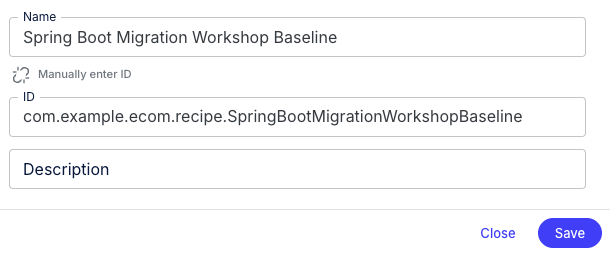
Auto-generate ID from namesetting so you can manually enter an ID, then fill in the fields as follows:- Name:
Spring Boot Migration Workshop Baseline - ID:
com.example.ecom.recipe.SpringBootMigrationWorkshopBaseline
- Name:
- Add the following recipes in order:
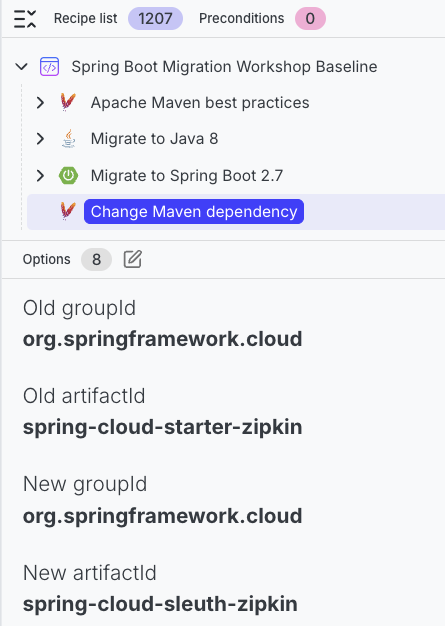
Apache Maven best practices(org.openrewrite.maven.BestPractices)Migrate to Java 8(org.openrewrite.java.migrate.UpgradeToJava8)Migrate to Spring Boot 2.7(org.openrewrite.java.spring.boot2.UpgradeSpringBoot_2_7)Exclude Maven dependency(org.openrewrite.maven.ExcludeDependency)- groupId:
org.hibernate.javax.persistence - artifactId:
hibernate-jpa-2.0-api - scope:
compile
- groupId:
Change Maven dependency(org.openrewrite.maven.ChangeDependencyGroupIdAndArtifactId)- Old groupId:
org.springframework.cloud - Old artifactId:
spring-cloud-starter-zipkin - New artifactId:
spring-cloud-sleuth-zipkin
- Old groupId:
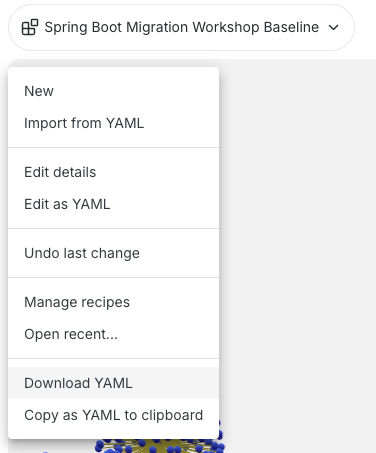
- Open the recipe dropdown (top left) and choose Download YAML.
Exercise 3-2: Apply the baseline in the CLI
Goals for this exercise
- Install the baseline recipe locally
- Apply changes across the workspace
- Build, commit, and release
Steps
Step 1: Save and install the recipe
Copy the downloaded YAML file to your $WORKSHOP directory and install it locally. The filename may vary depending on your browser — look for the most recently downloaded .yml file in your Downloads folder:
cp ~/Downloads/Spring\ Boot\ Migration\ Workshop\ Baseline.yml $WORKSHOP/WorkshopBaseline.yml
mod config recipes yaml install $WORKSHOP/WorkshopBaseline.yml
Step 2: Run the recipe and apply changes
Run the com.example.ecom.recipe.SpringBootMigrationWorkshopBaseline recipe that you just created in the platform and downloaded. When you run a recipe from the CLI, Moderne writes any changes to a patch file and leaves your working tree untouched until you're ready to explicitly apply it. So after you run the recipe, you use mod git apply to write the changes into the repos so you can review, test, and commit them:
mod run $WORKSPACE --recipe com.example.ecom.recipe.SpringBootMigrationWorkshopBaseline
mod git apply $WORKSPACE --last-recipe-run
Step 3: Build and release
The moderne-migration-practice repository you cloned in Module 2 includes helper scripts in $WORKSHOP. Use build.sh to build and run tests for all the projects, and release.sh to release your code for downstream dependencies to consume. The release script installs the current non-SNAPSHOT version of each repository into your local Maven cache (~/.m2), then bumps the project's version to the next minor SNAPSHOT. In a real organization, this step would be handled by your CI/CD pipeline publishing to an artifact repository. For this workshop, a local Maven install simulates that. Both scripts accept an optional wave number argument — for example, build.sh 1 only builds Wave 1 repositories.
You will be using both of these commands going forward after you make changes to the code to simulate the software development lifecycle of building and releasing new versions of these repositories that would usually be handled by your existing process outside of OpenRewrite and Moderne.
- Run
mod git statusto confirm that the files were indeed modified by the applied patch and are unstaged at this point.
mod git status $WORKSPACE
Reference output
   ▛▀▀▚▖  ▗▄▟▜
   ▌   ▜▄▟▀  ▐
   ▛▀▀█▀▛▀▀▀▀▜
   ▌▟▀  ▛▀▀▀▀▜
   ▀▀▀▀▀▀▀▀▀▀▀
Moderne CLI 4.9.2

⏺ Reading organization

Found 1 organization containing 11 repositories (1s)

⏺ Executing git status

Command output will be written to log

▶ modernetraining/example-ecom-common@main
    Unstaged changes: 1 modified file
▶ modernetraining/example-ecom-customer-service@main
    Unstaged changes: 1 modified file
▶ modernetraining/example-ecom-fraud-detection-service@main
    Unstaged changes: 1 modified file
▶ modernetraining/example-ecom-inventory-service@main
    Unstaged changes: 1 modified file
▶ modernetraining/example-ecom-kyc-service@main
    Unstaged changes: 1 modified file
▶ modernetraining/example-ecom-notification-service@main
    Unstaged changes: 1 modified file
▶ modernetraining/example-ecom-order-service@main
    Unstaged changes: 4 modified files
▶ modernetraining/example-ecom-product-service@main
    Unstaged changes: 1 modified file
▶ modernetraining/example-ecom-rest-client@main
    Unstaged changes: 1 modified file
▶ modernetraining/example-ecom-risk-score-service@main
    Unstaged changes: 1 modified file
▶ modernetraining/example-ecom-security@main
    Unstaged changes: 1 modified file
Done (1s)

Listed status for 11 repositories.
- Before you commit any code, you'll want to make sure the changes didn't break anything by validating that everything builds successfully. Then, if there are no build errors (there shouldn't be), you can add and commit the code:
$WORKSHOP/build.sh
mod git add $WORKSPACE --last-recipe-run
mod git commit $WORKSPACE -m "Workshop baseline: Maven, Java 8, Spring Boot 2.7" --last-recipe-run
Reference output
Starting build process...
Running Wave 0...
ecom-common built successfully
Running Wave 1...
ecom-security built successfully
inventory-service built successfully
kyc-service built successfully
notification-service built successfully
risk-score-service built successfully
Running Wave 2...
ecom-rest-client built successfully
customer-service built successfully
product-service built successfully
Running Wave 3...
fraud-detection-service built successfully
order-service built successfully
Build complete!
   ▛▀▀▚▖  ▗▄▟▜
   ▌   ▜▄▟▀  ▐
   ▛▀▀█▀▛▀▀▀▀▜
   ▌▟▀  ▛▀▀▀▀▜
   ▀▀▀▀▀▀▀▀▀▀▀
Moderne CLI 4.9.2

⏺ Reading organization

Found 1 organization containing 11 repositories (1s)
Found recipe run 20260115162634-J7PuY

⏺ Executing git add

Command output will be written to log

▶ modernetraining/example-ecom-common@main
    ✓ Added 1 files to index
▶ modernetraining/example-ecom-customer-service@main
    ✓ Added 1 files to index
▶ modernetraining/example-ecom-fraud-detection-service@main
    ✓ Added 1 files to index
▶ modernetraining/example-ecom-inventory-service@main
    ✓ Added 1 files to index
▶ modernetraining/example-ecom-kyc-service@main
    ✓ Added 1 files to index
▶ modernetraining/example-ecom-notification-service@main
    ✓ Added 1 files to index
▶ modernetraining/example-ecom-order-service@main
    ✓ Added 4 files to index
▶ modernetraining/example-ecom-product-service@main
    ✓ Added 1 files to index
▶ modernetraining/example-ecom-rest-client@main
    ✓ Added 1 files to index
▶ modernetraining/example-ecom-risk-score-service@main
    ✓ Added 1 files to index
▶ modernetraining/example-ecom-security@main
    ✓ Added 1 files to index
Done (1s)

Added files for 11 repositories.

⏺ What to do next
    > Run mod git checkout /Users/somebody/workspaces/migration-practice-workspace <branch-name> -b --last-recipe-run to create a new branch for your changes
    > Run mod git commit <path> --last-recipe-run to commit your changes to the current branch

MOD SUCCEEDED in 1s
   ▛▀▀▚▖  ▗▄▟▜
   ▌   ▜▄▟▀  ▐
   ▛▀▀█▀▛▀▀▀▀▜
   ▌▟▀  ▛▀▀▀▀▜
   ▀▀▀▀▀▀▀▀▀▀▀
Moderne CLI 4.9.2

⏺ Reading organization

Found 1 organization containing 11 repositories (1s)
Found recipe run 20260115162634-J7PuY

⏺ Executing git commit

Command output will be written to log

▶ modernetraining/example-ecom-common@main
    ✓ Committed changes.
▶ modernetraining/example-ecom-customer-service@main
    ✓ Committed changes.
▶ modernetraining/example-ecom-fraud-detection-service@main
    ✓ Committed changes.
▶ modernetraining/example-ecom-inventory-service@main
    ✓ Committed changes.
▶ modernetraining/example-ecom-kyc-service@main
    ✓ Committed changes.
▶ modernetraining/example-ecom-notification-service@main
    ✓ Committed changes.
▶ modernetraining/example-ecom-order-service@main
    ✓ Committed changes.
▶ modernetraining/example-ecom-product-service@main
    ✓ Committed changes.
▶ modernetraining/example-ecom-rest-client@main
    ✓ Committed changes.
▶ modernetraining/example-ecom-risk-score-service@main
    ✓ Committed changes.
▶ modernetraining/example-ecom-security@main
    ✓ Committed changes.
Done (1s)

Committed changes for 11 repositories.

⏺ What to do next
    > Run mod git push /Users/somebody/workspaces/migration-practice-workspace --last-recipe-run to push the changes to your remote repository
    > Run mod git push /Users/somebody/workspaces/migration-practice-workspace --last-recipe-run --set-upstream to push and track the changes to your remote repository

MOD SUCCEEDED in 1s
- Now the code has been modified and committed, you can run the first release, then rebuild LSTs so the CLI sees the updated code state:
$WORKSHOP/release.sh
mod build $WORKSPACE
If you see some LST build failures, continue anyway. You can still run recipes on the repos that do have valid LSTs.
Reference output
Starting Mass Release...
Running Wave 0...
Starting release process for ecom-common...
  Current: 1.1.0-SNAPSHOT
  Release: 1.1.0
  Next:    1.2.0-SNAPSHOT
  Setting version to 1.1.0...
  Running release build...
  Build successful.
  Setting version to 1.2.0-SNAPSHOT...
  Release process complete for ecom-common. New version: 1.2.0-SNAPSHOT
Running Wave 1...
Starting release process for ecom-security...
  Current: 1.1.0-SNAPSHOT
  Release: 1.1.0
  Next:    1.2.0-SNAPSHOT
  Setting version to 1.1.0...
  Running release build...
  Build successful.
  Setting version to 1.2.0-SNAPSHOT...
  Release process complete for ecom-security. New version: 1.2.0-SNAPSHOT
Starting release process for inventory-service...
  Current: 1.1.0-SNAPSHOT
  Release: 1.1.0
  Next:    1.2.0-SNAPSHOT
  Setting version to 1.1.0...
  Running release build...
  Build successful.
  Setting version to 1.2.0-SNAPSHOT...
  Release process complete for inventory-service. New version: 1.2.0-SNAPSHOT
Starting release process for kyc-service...
  Current: 1.1.0-SNAPSHOT
  Release: 1.1.0
  Next:    1.2.0-SNAPSHOT
  Setting version to 1.1.0...
  Running release build...
  Build successful.
  Setting version to 1.2.0-SNAPSHOT...
  Release process complete for kyc-service. New version: 1.2.0-SNAPSHOT
Starting release process for notification-service...
  Current: 1.1.0-SNAPSHOT
  Release: 1.1.0
  Next:    1.2.0-SNAPSHOT
  Setting version to 1.1.0...
  Running release build...
  Build successful.
  Setting version to 1.2.0-SNAPSHOT...
  Release process complete for notification-service. New version: 1.2.0-SNAPSHOT
Starting release process for risk-score-service...
  Current: 1.1.0-SNAPSHOT
  Release: 1.1.0
  Next:    1.2.0-SNAPSHOT
  Setting version to 1.1.0...
  Running release build...
  Build successful.
  Setting version to 1.2.0-SNAPSHOT...
  Release process complete for risk-score-service. New version: 1.2.0-SNAPSHOT
Running Wave 2...
Starting release process for ecom-rest-client...
  Current: 1.1.0-SNAPSHOT
  Release: 1.1.0
  Next:    1.2.0-SNAPSHOT
  Setting version to 1.1.0...
  Running release build...
  Build successful.
  Setting version to 1.2.0-SNAPSHOT...
  Release process complete for ecom-rest-client. New version: 1.2.0-SNAPSHOT
Starting release process for customer-service...
  Current: 1.1.0-SNAPSHOT
  Release: 1.1.0
  Next:    1.2.0-SNAPSHOT
  Setting version to 1.1.0...
  Running release build...
  Build successful.
  Setting version to 1.2.0-SNAPSHOT...
  Release process complete for customer-service. New version: 1.2.0-SNAPSHOT
Starting release process for product-service...
  Current: 1.1.0-SNAPSHOT
  Release: 1.1.0
  Next:    1.2.0-SNAPSHOT
  Setting version to 1.1.0...
  Running release build...
  Build successful.
  Setting version to 1.2.0-SNAPSHOT...
  Release process complete for product-service. New version: 1.2.0-SNAPSHOT
Running Wave 3...
Starting release process for fraud-detection-service...
  Current: 1.1.0-SNAPSHOT
  Release: 1.1.0
  Next:    1.2.0-SNAPSHOT
  Setting version to 1.1.0...
  Running release build...
  Build successful.
  Setting version to 1.2.0-SNAPSHOT...
  Release process complete for fraud-detection-service. New version: 1.2.0-SNAPSHOT
Starting release process for order-service...
  Current: 1.1.0-SNAPSHOT
  Release: 1.1.0
  Next:    1.2.0-SNAPSHOT
  Setting version to 1.1.0...
  Running release build...
  Build successful.
  Setting version to 1.2.0-SNAPSHOT...
  Release process complete for order-service. New version: 1.2.0-SNAPSHOT
Mass Release Complete!
   ▛▀▀▚▖  ▗▄▟▜
   ▌   ▜▄▟▀  ▐
   ▛▀▀█▀▛▀▀▀▀▜
   ▌▟▀  ▛▀▀▀▀▜
   ▀▀▀▀▀▀▀▀▀▀▀
Moderne CLI 4.9.2

⏺ Reading organization

Found 1 organization containing 11 repositories (1s)

⏺ Building LST(s)

▶ modernetraining/example-ecom-common@main
    Build output will be written to build.log
    > Step 1 - build with Maven
        Selected the 17.0.12-tem JDK for example-ecom-common
    > Step 2 - build resources
    ✓ Built example-ecom-common-20260115165721847-ast.jar
    Cleaned 1 older builds
▶ modernetraining/example-ecom-customer-service@main
    Build output will be written to build.log
    > Step 1 - build with Maven
        Selected the 17.0.12-tem JDK for example-ecom-customer-service
    > Step 2 - build resources
    ✓ Built example-ecom-customer-service-20260115165729938-ast.jar
    Cleaned 1 older builds
▶ modernetraining/example-ecom-fraud-detection-service@main
    Build output will be written to build.log
    > Step 1 - build with Maven
        Selected the 17.0.12-tem JDK for example-ecom-fraud-detection-service
    > Step 2 - build resources
    ✓ Built example-ecom-fraud-detection-service-20260115165736475-ast.jar
    Cleaned 1 older builds
▶ modernetraining/example-ecom-inventory-service@main
    Build output will be written to build.log
    > Step 1 - build with Maven
        Selected the 17.0.12-tem JDK for example-ecom-inventory-service
    > Step 2 - build resources
    ✓ Built example-ecom-inventory-service-20260115165743731-ast.jar
    Cleaned 1 older builds
▶ modernetraining/example-ecom-kyc-service@main
    Build output will be written to build.log
    > Step 1 - build with Maven
        Selected the 17.0.12-tem JDK for example-ecom-kyc-service
    > Step 2 - build resources
    ✓ Built example-ecom-kyc-service-20260115165750292-ast.jar
    Cleaned 1 older builds
▶ modernetraining/example-ecom-notification-service@main
    Build output will be written to build.log
    > Step 1 - build with Maven
        Selected the 17.0.12-tem JDK for example-ecom-notification-service
    > Step 2 - build resources
    ✓ Built example-ecom-notification-service-20260115165756930-ast.jar
    Cleaned 1 older builds
▶ modernetraining/example-ecom-order-service@main
    Build output will be written to build.log
    > Step 1 - build with Maven
        Selected the 17.0.12-tem JDK for example-ecom-order-service
    > Step 2 - build resources
    ✓ Built example-ecom-order-service-20260115165807462-ast.jar
    Cleaned 1 older builds
▶ modernetraining/example-ecom-product-service@main
    Build output will be written to build.log
    > Step 1 - build with Maven
        Selected the 17.0.12-tem JDK for example-ecom-product-service
    > Step 2 - build resources
    ✓ Built example-ecom-product-service-20260115165814437-ast.jar
    Cleaned 1 older builds
▶ modernetraining/example-ecom-rest-client@main
    Build output will be written to build.log
    > Step 1 - build with Maven
        Selected the 17.0.12-tem JDK for example-ecom-rest-client
    > Step 2 - build resources
    ✓ Built example-ecom-rest-client-20260115165820429-ast.jar
    Cleaned 1 older builds
▶ modernetraining/example-ecom-risk-score-service@main
    Build output will be written to build.log
    > Step 1 - build with Maven
        Selected the 17.0.12-tem JDK for example-ecom-risk-score-service
    > Step 2 - build resources
    ✓ Built example-ecom-risk-score-service-20260115165826677-ast.jar
    Cleaned 1 older builds
▶ modernetraining/example-ecom-security@main
    Build output will be written to build.log
    > Step 1 - build with Maven
        Selected the 17.0.12-tem JDK for example-ecom-security
    > Step 2 - build resources
    ✓ Built example-ecom-security-20260115165832143-ast.jar
    Cleaned 1 older builds
Done (1m 16s)

Built 11 repositories.

⏺ What to do next
    > Run mod run /Users/somebody/workspaces/migration-practice-workspace --recipe=<RecipeName>
    > Analyze build results with mod trace builds analyze /Users/somebody/workspaces/migration-practice-workspace --last-build
    > Run mod log builds add /Users/somebody/workspaces/migration-practice-workspace logs.zip --last-build to aggregate build logs

MOD SUCCEEDED in 1m 18s
Takeaways
- Establishing a shared baseline reduces variance so later upgrades focus on fewer, clearer changes.
- Run recipe → apply → review → commit becomes the repeatable flow for every wave.
- Build and release steps keep downstream repositories in sync as you move through the waves.