Module 2: Wave planning with the Moderne CLI

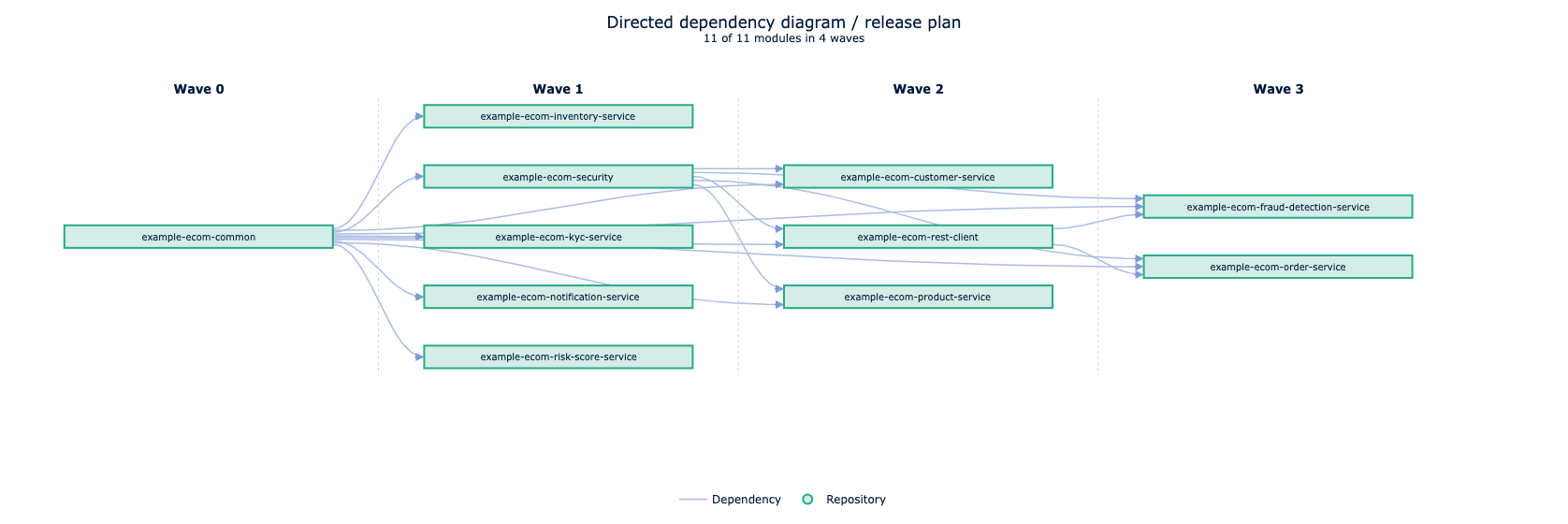
In this module, you'll move from SaaS-only assessment to CLI-driven analysis so you can map dependencies and pick a safe upgrade order. You will group repositories into “waves” based on those dependencies and upgrade them in order.

For this workshop, each repository is treated as independently released. That constraint mirrors how large organizations manage shared libraries and it forces you to think about sequencing instead of upgrading everything at once. Dependencies matter because downstream repos can only move once their upstream libraries are upgraded and released.

Exercise 2-1: Set up your workspace

Goals for this exercise

  • Create a workspace and sync repositories
  • Install the set of recipes required for this workshop

Steps

Step 1: Set environment variables

Choose paths for your workshop and workspace and set the following environment variables so you can better follow along with the commands. If you want to copy commands directly, you can use these example values, but make sure to create the directories first:

export WORKSHOP=~/projects/moderne-migration-practice
export WORKSPACE=~/workspaces/migration-practice-workspace
export PROJECTS=~/projects
tip

You might want to keep two shells open: one in $WORKSHOP for scripts and one in $WORKSPACE for mod commands.

Step 2: Sync repos

  1. First, clone the Moderne Migration Practice workshop which contains some helper scripts and metadata about the example projects.
mkdir -p $PROJECTS
cd $PROJECTS
git clone https://github.com/modernetraining/moderne-migration-practice
  1. Now we'll create a workspace directory to house our code repositories:
mkdir -p $WORKSPACE
cd $WORKSPACE
  1. There are two ways to pull repositories with the Moderne CLI: sync directly from a Moderne Platform organization or sync from a local repos.csv file. We'll start by pulling from the platform organization, which downloads both the source code and the LSTs (Lossless Semantic Trees). The LST is OpenRewrite's rich code model that recipes use to make accurate, safe changes. Use the following command to sync the repositories:
mod git sync moderne $WORKSPACE --organization "Moderne - Training" --with-sources
Reference output
   ▛▀▀▚▖  ▗▄▟▜
▌ ▜▄▟▀ ▐
▛▀▀█▀▛▀▀▀▀▜
▌▟▀ ▛▀▀▀▀▜
▀▀▀▀▀▀▀▀▀▀▀
Moderne CLI 3.55.3

⏺ Retrieving organization from Moderne

Found organization ALL/Moderne/Moderne - Training
Organization written to disk at file:///Users/somebody/workspaces/migration-practice-workspace/.moderne/repos.csv

⏺ Analyzing organization structure

Done (1s)

Selected organization ALL/Moderne/Moderne - Training

⏺ Synchronizing organization directory structure

Found 1 organization containing 11 repositories

Adding organization Moderne - Training
Adjusted 1 organization directory. (1s)

⏺ Performing Git operations on repositories

▶ modernetraining/example-ecom-common@main
✓ Checked out 8c1d5d4 on branch main
▶ modernetraining/example-ecom-notification-service@main
✓ Checked out 0d3b871 on branch main
▶ modernetraining/example-ecom-security@main
✓ Checked out 1c0ff16 on branch main
▶ modernetraining/example-ecom-customer-service@main
✓ Checked out e36017c on branch main
▶ modernetraining/example-ecom-kyc-service@main
✓ Checked out 82a20e5 on branch main
▶ modernetraining/example-ecom-fraud-detection-service@main
✓ Checked out 82fccd5 on branch main
▶ modernetraining/example-ecom-risk-score-service@main
✓ Checked out e96348f on branch main
▶ modernetraining/example-ecom-product-service@main
✓ Checked out 2e37d7d on branch main
▶ modernetraining/example-ecom-rest-client@main
✓ Checked out 0d58140 on branch main
▶ modernetraining/example-ecom-inventory-service@main
✓ Checked out ceb0b19 on branch main
▶ modernetraining/example-ecom-order-service@main
✓ Checked out 9e75f2d on branch main
Done (3s)

⏺ Downloading LSTs for repositories

▶ modernetraining/example-ecom-rest-client@main
✓ Downloaded example-ecom-rest-client-20260119194611806-ast.jar
▶ modernetraining/example-ecom-common@main
✓ Downloaded example-ecom-common-20260119194356726-ast.jar
▶ modernetraining/example-ecom-security@main
✓ Downloaded example-ecom-security-20260119194637743-ast.jar
▶ modernetraining/example-ecom-risk-score-service@main
✓ Downloaded example-ecom-risk-score-service-20260119194625433-ast.jar
▶ modernetraining/example-ecom-notification-service@main
✓ Downloaded example-ecom-notification-service-20260119194526158-ast.jar
▶ modernetraining/example-ecom-fraud-detection-service@main
✓ Downloaded example-ecom-fraud-detection-service-20260119194438286-ast.jar
▶ modernetraining/example-ecom-kyc-service@main
✓ Downloaded example-ecom-kyc-service-20260119194510367-ast.jar
▶ modernetraining/example-ecom-inventory-service@main
✓ Downloaded example-ecom-inventory-service-20260119194457543-ast.jar
▶ modernetraining/example-ecom-product-service@main
✓ Downloaded example-ecom-product-service-20260119194559625-ast.jar
▶ modernetraining/example-ecom-customer-service@main
✓ Downloaded example-ecom-customer-service-20260119194422140-ast.jar
▶ modernetraining/example-ecom-order-service@main
✓ Downloaded example-ecom-order-service-20260119194543744-ast.jar
Done (1s)

Synced 11 repositories.

⏺ What to do next
> Examine clone telemetry

MOD SUCCEEDED in 5s
  1. Take a look at the contents of your $WORKSPACE folder now. (You can walk through and inspect the directories with cd and ls, or if you have tree, you can see the full structure with tree -d $WORKSPACE -L 3.) You should see that you have a directory for the GitHub org (or user) with the repositories inside.

Step 3: Install the recipe set

Use the following command to install the necessary OpenRewrite recipe modules for this workshop:

mod config recipes jar install \
io.moderne.recipe:rewrite-spring \
org.openrewrite.recipe:rewrite-migrate-java \
org.openrewrite.recipe:rewrite-java-dependencies \
org.openrewrite:rewrite-java \
org.openrewrite:rewrite-maven \
io.moderne.recipe:rewrite-devcenter \
org.openrewrite.recipe:rewrite-spring \
org.openrewrite.recipe:rewrite-testing-frameworks
info

Installing recipes locally can sometimes take a few minutes, so this list of recipe packages is limited to only the ones required for this workshop. You can find a list of recipes by module in the OpenRewrite documentation.

Exercise 2-2: Generate a dependency-based wave plan

Now that your local environment is ready, it's time to use OpenRewrite's rich dependency data to determine a safe upgrade order. The goal is to identify repos with no internal dependencies ("Wave 0"), release them, then move downstream in order.

Goals for this exercise

  • Install the Release-Train-Metro-Plan recipes
  • Run a dependency analysis recipe
  • Export data tables for wave planning

Steps

Step 1: Install the Release-Train-Metro-Plan recipes

Merlin’s Release-Train-Metro-Plan project analyzes direct and transitive dependencies to generate a wave map (using a Jupyter notebook). You will use this method to produce a concrete upgrade plan you can follow.

Use the following commands to clone the project (somewhere outside of $WORKSPACE such as $PROJECTS) and install the recipe artifact locally:

cd $PROJECTS
git clone https://github.com/MBoegers/Release-Train-Metro-Plan.git
mod config recipes jar install dev.mboegie.rewrite:release-train-metro-plan:RELEASE

Step 2: Extract data from dependency analysis

  1. Run the newly-installed recipe on the collection of repositories in your workspace:
mod run $WORKSPACE --recipe dev.mboegie.rewrite.releasemetro.ReleaseMetroPlan --parallel
  1. Retrieve the recipe run ID from this run. You'll need it to generate the report in a following step.
mod run-history $WORKSPACE
Reference output
   ▛▀▀▚▖  ▗▄▟▜
▌ ▜▄▟▀ ▐
▛▀▀█▀▛▀▀▀▀▜
▌▟▀ ▛▀▀▀▀▜
▀▀▀▀▀▀▀▀▀▀▀
Moderne CLI 3.55.3

⏺ Reading organization

Found 1 organization containing 11 repositories (1s)

⏺ Retrieving recipe run history

▶ modernetraining/example-ecom-common@main
✓ Recipe runs processed.
▶ modernetraining/example-ecom-customer-service@main
✓ Recipe runs processed.
▶ modernetraining/example-ecom-fraud-detection-service@main
✓ Recipe runs processed.
▶ modernetraining/example-ecom-inventory-service@main
✓ Recipe runs processed.
▶ modernetraining/example-ecom-kyc-service@main
✓ Recipe runs processed.
▶ modernetraining/example-ecom-notification-service@main
✓ Recipe runs processed.
▶ modernetraining/example-ecom-order-service@main
✓ Recipe runs processed.
▶ modernetraining/example-ecom-product-service@main
✓ Recipe runs processed.
▶ modernetraining/example-ecom-rest-client@main
✓ Recipe runs processed.
▶ modernetraining/example-ecom-risk-score-service@main
✓ Recipe runs processed.
▶ modernetraining/example-ecom-security@main
✓ Recipe runs processed.
Done (1s)

[1] 20260114165424-VXLMR dev.mboegie.rewrite.releasemetro.ReleaseMetroPlan
Data tables produced:
dev.mboegie.rewrite.releasemetro.table.ParentRelationships
dev.mboegie.rewrite.releasemetro.table.ProjectCoordinates
org.openrewrite.table.RecipeRunStats
org.openrewrite.table.SearchResults
org.openrewrite.table.SourcesFileResults
dev.mboegie.rewrite.releasemetro.table.UnusedDependencies
org.openrewrite.maven.table.ExplainDependenciesInUse
org.openrewrite.maven.table.DependenciesInUse

Found results for 1 recipe run.

⏺ What to do next
> Run mod study /Users/somebody/workspaces/migration-practice-workspace --recipe-run <RUN-ID> --data-table <DATA-TABLE> to examine the data tables produced by the recipe run.
  1. You'll need to export all of the generated data tables in order to build the report using the following commands:
mod study $WORKSPACE --last-recipe-run --data-table ParentRelationships
mod study $WORKSPACE --last-recipe-run --data-table ProjectCoordinates
mod study $WORKSPACE --last-recipe-run --data-table UnusedDependencies
mod study $WORKSPACE --last-recipe-run --data-table org.openrewrite.maven.table.DependenciesInUse

Step 3: Generate the wave map

  1. To run the Jupyter notebook, you will need Python and a small virtual environment setup. It is recommended to use uv, a fast Python package manager and virtual environment tool. If you do not have it installed, follow the install steps in the uv documentation.

Run these commands once to create the virtual environment and install the notebook dependencies:

cd $PROJECTS/Release-Train-Metro-Plan
uv venv
source .venv/bin/activate
uv sync
  1. You can run the notebook using the command line tool papermill CLI tool, or use a Jupyter notebook UI. Choose one of these two options:

This is the easiest option if you want to run the notebook end-to-end from the CLI. Make sure you replace <recipe_run_id> with the ID you retrieved in the previous step.

papermill $PROJECTS/Release-Train-Metro-Plan/src/main/python/ArchitecturalAnalysis.ipynb \
$PROJECTS/Release-Train-Metro-Plan/src/main/python/ArchitecturalAnalysis_out.ipynb \
-p workspace $WORKSPACE \
-p recipe_run <recipe_run_id> \
--progress-bar \
--inject-paths
note

If neither option works for you or you don't have a Python environment, don't worry. You can skip the rest of this exercise and still continue with the workshop using the wave list shown in the next exercise.

  1. Open the generated output HTML file to view the wave diagram and note the repository order:
open $PROJECTS/Release-Train-Metro-Plan/src/main/static/metro-plan.html
  1. Now that you have a wave plan, you need a way to target a specific wave with recipe runs and releases. Instead of syncing with the organization in the platform as you did before, you will now use the repos.csv method to group repositories by wave. There are a few ways could do that:
  • Run mod commands inside each repository manually (fine for a few repos, painful at scale)
  • Create separate repos.csv files per wave and sync each into its own workspace
  • Use the repos.csv organization columns to group repos by wave in a single workspace

You will use the third option in this workshop so you can run both org-wide recipes and wave-specific recipes in a single wave directory from the root folder.

Exercise 2-3: Organize your workspace by wave

Goals for this exercise

  • Restructure the workspace so waves are separate directories

Steps

  1. In the root of your $WORKSHOP, review the wave-aware CSV file (repos-waves.csv) and note the addition of the organization fields and the grouping of repositories based on the wave plan from the previous exercise.
note

There is a repos.csv file in the root of the workshop as well, which represents the flat structure that is reflected in the platform and in the local directory after syncing with the platform earlier in this module. The repos-waves.csv is the one that includes the addition of organization fields that group the repositories by wave, in order, as determined in the previous exercise. For more information, check out our repos.csv documentation.

  1. Sync the repos again, this time using the wave-aware CSV file:
mod git sync csv $WORKSPACE $WORKSHOP/repos-waves.csv --with-sources
  1. If prompted to replace the existing organization, type Y.
  2. Inspect the new structure (using cd and ls or tree -d . -L 3 if you have it).

You can now run mod commands across the entire workspace or target a specific wave directory like $WORKSPACE/Wave0.

Takeaways

  • Dependency data helps you define a safe upgrade order
  • The Release-Train-Metro-Plan workflow turns data tables into a wave map
  • Organizing repos by wave lets you run recipes and releases in controlled batches