Module 2: Recipe builder and declarative recipes
In this module, you'll learn how to use the Moderne recipe builder to compose custom recipes and understand the anatomy of declarative YAML recipes.
Key concepts
What is a declarative recipe?
A declarative recipe is a recipe defined in YAML that combines and configures existing recipes. Declarative recipes are powerful because they allow you to:
- Combine multiple recipes into a single, reusable unit
- Configure recipe options for your specific needs
- Create organization-specific migration recipes without writing code
For example, the org.openrewrite.staticanalysis.CommonStaticAnalysis recipe you ran in Module 1 is a declarative recipe that composes many smaller static-analysis fix recipes. You can browse its YAML definition in the OpenRewrite recipe source: CommonStaticAnalysis YAML.
Anatomy of a YAML recipe
A declarative YAML recipe has the following basic structure:
---
type: specs.openrewrite.org/v1beta/recipe
name: com.yourorg.MyRecipe
displayName: My Custom Recipe
description: A recipe that does something useful.
recipeList:
  - org.openrewrite.java.SomeRecipe:
      option1: value1
      option2: value2
  - org.openrewrite.java.AnotherRecipe
Key elements:
- type: Always
specs.openrewrite.org/v1beta/recipe - name: Fully-qualified unique name for your recipe
- displayName: Human-readable name for your recipe
- description: Description of the recipe explaining what it does (must end with a period)
- recipeList: The list of recipes to run, with their options
Recipe builder
The Moderne recipe builder provides a visual interface for creating declarative recipes without writing YAML by hand. You can:
- Search and add recipes from the catalog
- Configure recipe options
- Preview and download the resulting YAML
- Run your custom recipe directly from the builder
Exercise 2-1: Compose a YAML recipe with the recipe builder
In this exercise, you'll create a custom migration recipe that replaces Spring's StringUtils with Apache Commons StringUtils.
Goals for this exercise
- Use the recipe builder to compose a new recipe
- Combine "Add dependency" with "Change type" recipes
- Download the YAML and run it locally with the CLI
Steps
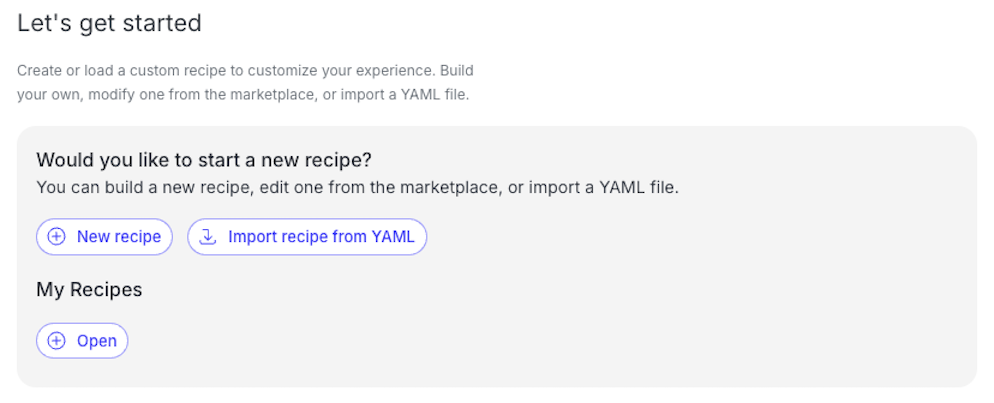
Step 1: Open the recipe builder
- Navigate to app.moderne.io and sign in if you haven't already.
- Make sure the Default organization is still selected.
- Click on
Builderin the left navigation. - Now click the
+ New recipeat the bottom of the "Manage my recipes" screen, or if the Builder is already showing a recipe, click the recipe name in the upper left and selectNew.
Step 2: Define your recipe
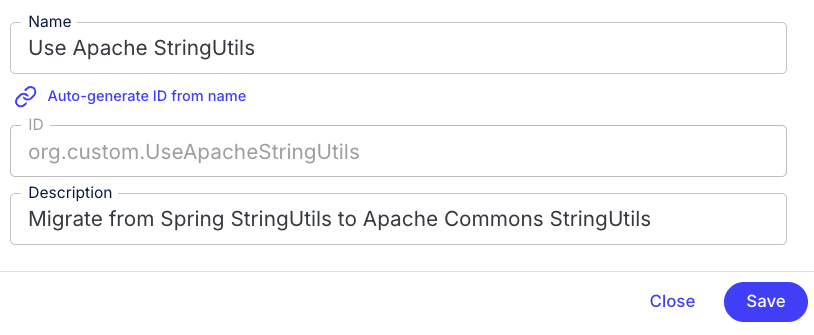
- Enter the name
Use Apache StringUtilsfor your recipe. - The system will auto-generate an ID like
com.yourorg.UseApacheStringUtils. You can customize this if you want by toggling "Auto-generate ID from name" to "Manually enter ID". - Add a description:
Migrate from Spring StringUtils to Apache Commons StringUtils. - Click Save.
Step 3: Add the dependency recipe
First, you need to add the Apache Commons Lang dependency:
- Mouse over the root node in the recipe list on the right and click the
+button. The root node should match the display name you entered in the previous step (Use Apache StringUtils).
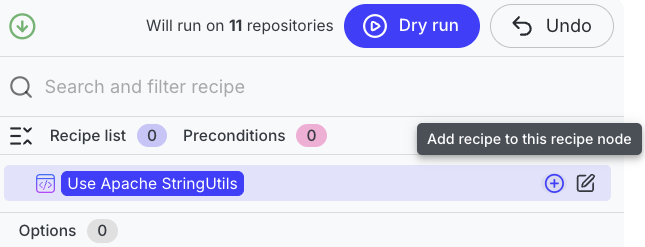
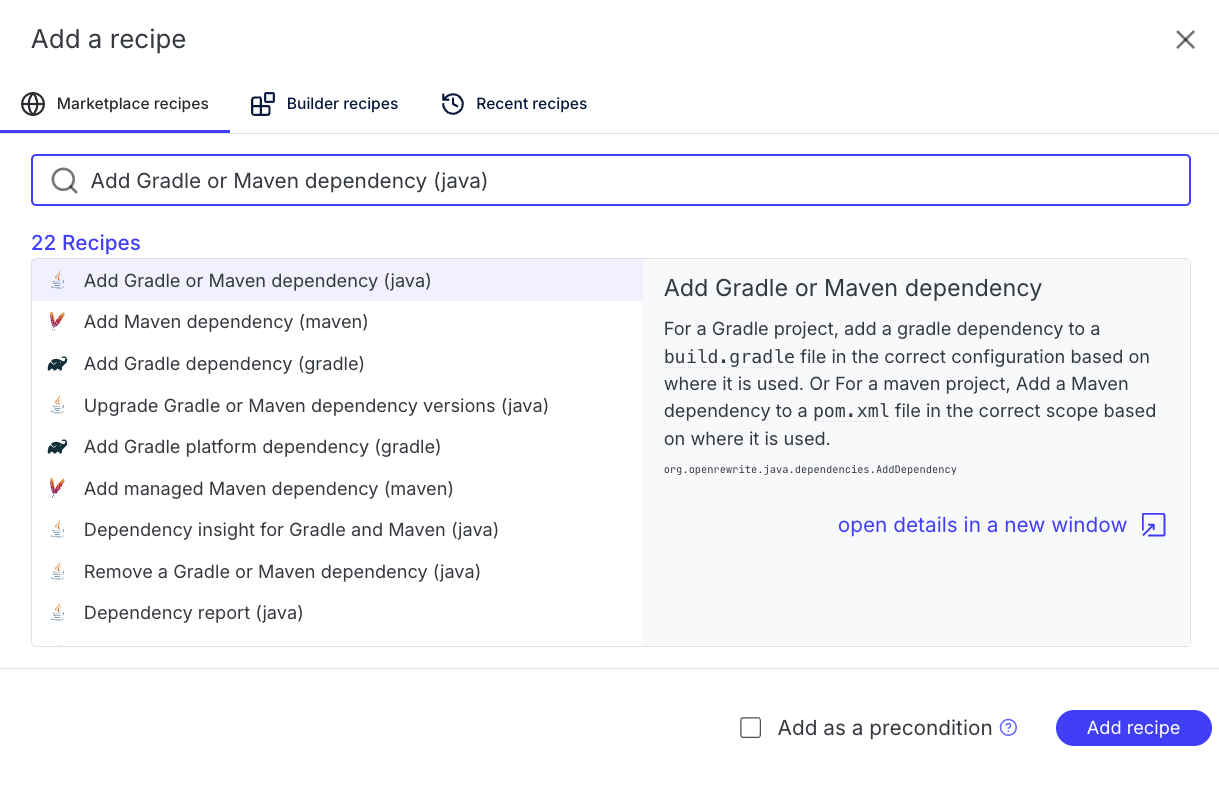
- Search for
Add Gradle or Maven dependency (java)and select it. - Click Add recipe in the lower right of the screen.
- Configure the options:
- Group ID:
org.apache.commons - Artifact ID:
commons-lang3 - Version:
3.x - Only if using:
org.springframework.util.StringUtils - You can leave all of the other options blank/default.
- Group ID:
- Scroll down and click Update to add the configured recipe.
Step 4: Add the change type recipe
Now you'll add a recipe to change the import from Spring to Apache:
- Click the
+button on the root node again. - Now search for
Change type (java)and select it. - Click Add recipe in the lower right of the screen.
- Configure the options:
- Old fully-qualified type name:
org.springframework.util.StringUtils - New fully-qualified type name:
org.apache.commons.lang3.StringUtils
- Old fully-qualified type name:
- Click Update to add the recipe.
Step 5: Add method name changes (optional)
Spring's StringUtils has some methods with different names than Apache's version. Let's add a recipe to handle trimWhitespace:
- Click the
+button on the root node once again. - This time, search for
Change method name (java). - Click Add recipe in the lower right of the screen as before.
- Configure the options:
- Method pattern:
org.apache.commons.lang3.StringUtils trimWhitespace(java.lang.String) - New method name:
strip
- Method pattern:
- Click Update to add this recipe.
Notice that the method pattern uses org.apache.commons.lang3.StringUtils even though you're changing from Spring's method. This is because recipes run in order, so by the time this recipe runs, the ChangeType recipe has already changed the import and type references.
Step 6: Preview and download the YAML
- Your recipe should now have three sub-recipes in the list.
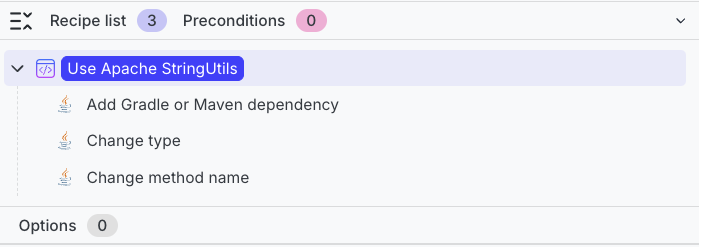
- From the recipe builder, click
Dry Runat the top of the screen to quickly test your custom recipe against the currently selected organization. - Once the recipe run completes you can verify the results. Then return to the recipe builder and click on the recipe name in the upper left corner.
- Select Download YAML to save the recipe file. Alternatively, you can use Copy as YAML to clipboard and paste into a new YAML document on your computer.
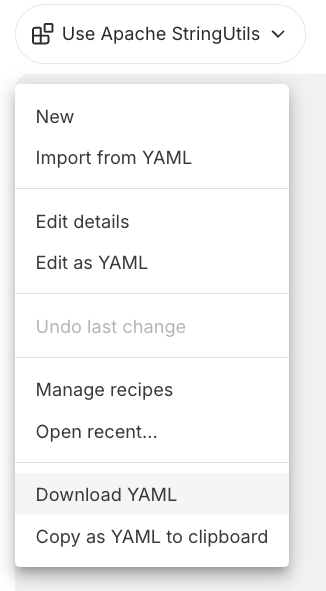
The downloaded YAML should look similar to this:
---
type: specs.openrewrite.org/v1beta/recipe
name: com.yourorg.UseApacheStringUtils
displayName: Use Apache StringUtils
description: Migrate from Spring StringUtils to Apache Commons StringUtils.
recipeList:
  - org.openrewrite.java.dependencies.AddDependency:
      groupId: org.apache.commons
      artifactId: commons-lang3
      version: 3.x
      onlyIfUsing: org.springframework.util.StringUtils
  - org.openrewrite.java.ChangeType:
      oldFullyQualifiedTypeName: org.springframework.util.StringUtils
      newFullyQualifiedTypeName: org.apache.commons.lang3.StringUtils
  - org.openrewrite.java.ChangeMethodName:
      methodPattern: org.apache.commons.lang3.StringUtils trimWhitespace(java.lang.String)
      newMethodName: strip
Step 7: Install and run with the CLI
To run your custom recipe locally:
- Copy the downloaded YAML file to the workspace folder you created in the last module.
# Use the path that you downloaded the yml file to
cp ~/Downloads/Use\ Apache\ StringUtils.yml ~/moderne-workshop/stringutils.yml
- Install the recipe into the CLI:
mod config recipes yaml install ~/moderne-workshop/stringutils.yml
Reference output
   ▛▀▀▚▖  ▗▄▟▜
   ▌   ▜▄▟▀  ▐
   ▛▀▀█▀▛▀▀▀▀▜
   ▌▟▀  ▛▀▀▀▀▜
   ▀▀▀▀▀▀▀▀▀▀▀
Moderne CLI 4.9.1

⏺ Installing recipes from YAML files

▶ /Users/somebody/moderne-workshop/stringutils.yml
    Found 1 recipes
    ✓ Installed recipes.
Done (1s)

Installed 1 YAML file.

MOD SUCCEEDED in 1s
- Run the recipe against your workspace:
# If you used a different fully-qualified name for your recipe, make sure to use that here instead
mod run ~/moderne-workshop --recipe com.yourorg.UseApacheStringUtils
Again, you may see The latest LST is not up to date messages for some repositories because you applied changes from a recipe in the last module but didn't rebuild the LSTs. You'll see how to do rebuild LSTs in the next module, but for now you can ignore these warnings since you won't be applying these changes anyway.
Reference output
   ▛▀▀▚▖  ▗▄▟▜
   ▌   ▜▄▟▀  ▐
   ▛▀▀█▀▛▀▀▀▀▜
   ▌▟▀  ▛▀▀▀▀▜
   ▀▀▀▀▀▀▀▀▀▀▀
Moderne CLI 4.9.1

⏺ Reading organization

Found 1 organization containing 11 repositories (1s)

⏺ Running recipe com.yourorg.UseApacheStringUtils

▶ openrewrite/rewrite-recipe-bom@main (no LST)
    Skipped recipe run because no LST was found
▶ awslabs/aws-saas-boost@main (no LST)
    Skipped recipe run because no LST was found
▶ apache/maven-doxia@master (no LST)
    Skipped recipe run because no LST was found
▶ finos/messageml-utils@refactor/common-static-analysis
    ⚠ The latest LST is not up to date
    No changes
    ✓ Recipe run complete
▶ spring-projects/spring-petclinic@refactor/common-static-analysis
    ⚠ The latest LST is not up to date
    Fix results
    ✓ Recipe run complete
▶ Netflix/photon@refactor/common-static-analysis
    ⚠ The latest LST is not up to date
    No changes
    ✓ Recipe run complete
▶ Netflix/ribbon@refactor/common-static-analysis
    ⚠ The latest LST is not up to date
    No changes
    ✓ Recipe run complete
▶ finos/symphony-wdk@refactor/common-static-analysis
    ⚠ The latest LST is not up to date
    No changes
    ✓ Recipe run complete
▶ finos/symphony-bdk-java@refactor/common-static-analysis
    ⚠ The latest LST is not up to date
    No changes
    ✓ Recipe run complete
▶ finos/spring-bot@refactor/common-static-analysis
    ⚠ The latest LST is not up to date
    Fix results
    ✓ Recipe run complete
▶ spring-projects/spring-data-commons@refactor/common-static-analysis
    ⚠ The latest LST is not up to date
    Fix results
    ✓ Recipe run complete
Done (16s)

21m 32s saved by using previously built LSTs
6h 25m saved by using recipes

Produced results for 8 repositories.

⏺ What to do next
    > A repository's source code doesn't match its LST. Run mod build to update the LSTs.
    > Click on one of the patch links above to view the changes on a particular repository
    > Run mod study to examine the following data tables produced by this recipe:
          > mod study /Users/somebody/moderne-workshop --last-recipe-run --data-table RecipeRunStats
          > mod study /Users/somebody/moderne-workshop --last-recipe-run --data-table SourcesFileResults
    > Run mod git checkout /Users/somebody/moderne-workshop -b refactor/UseApacheStringUtils --last-recipe-run to prepare a refactor/UseApacheStringUtils branch for applying the changes
    > Run mod git apply /Users/somebody/moderne-workshop --last-recipe-run to apply the changes
    > Run mod git apply /Users/somebody/moderne-workshop --recipe-run 20260105160406-B7BQB to apply the changes
    > Run mod log runs add /Users/somebody/moderne-workshop logs.zip --last-recipe-run to aggregate run logs
    > Examine run telemetry

MOD SUCCEEDED in 17s
You also need the recipes referenced in your YAML to be available. If you've already synced recipes with mod config recipes moderne sync, they should be available.
Once again, you can open any of the Fix results links and review the diffs to see exactly what would change in each repository from this recipe if you were to apply the patch.
Takeaways
- The recipe builder provides a visual way to create declarative recipes
- Recipes in the
recipeListare executed in order, which matters for chained transformations - You can download YAML recipes and run them locally with the CLI
- Custom recipes can be shared with your team by distributing the YAML file