GitHub permissions
Moderne uses a GitHub OAuth application (GitHub OAuth Apps or GitHub Apps) to perform various actions on your behalf. Below is an explanation of each type, their permissions, and how they're used by Moderne.
GitHub App permissions (preferred)
For GitHub Apps, Moderne requires a select number of OAuth scopes necessary to help you transform your code. The GitHub application can be installed into your personal, organization, or enterprise accounts as desired.
| Permission | Access | Description |
|---|---|---|
| Repositories - Contents | Read/write | Create branches and push changesets on your behalf. |
| Repositories - Pull Requests | Read/write | Create, close, and merge pull requests on your behalf. |
| Repositories - Commit statuses | Read-only | View CI status from the legacy commit status API. |
| Repositories - Checks | Read-only | View CI status from GitHub Actions and other check providers. |
| Repositories - Workflows | Read/write | Recipes that alter GitHub Action workflow files require this permission to make commits to them. |
| Account Permissions - Email addresses | Read-only | Recognize your account as a new or returning user. |
| Repositories - Administration (optional) | Read/write | The only optional permission in this list. Needed for Fork and ForkAndPullRequest commit options in order to create personal forks. |
You'll need to install the GitHub application wherever you want to make code changes:
- For personal forks: Install it in your personal account and ensure the Repositories - Administration permission is enabled.
- For organization repositories: Install it directly in the organization, or in your enterprise account (which automatically covers all member organizations).
Without the application installed, GitHub will reject any attempts to commit changes.
Installing a GitHub App
After creating your GitHub App, you need to install it in the organizations or accounts where you want Moderne to operate. This section walks through the installation process.
Starting the installation
Navigate to your GitHub App's settings and select Install App from the left sidebar. You'll see a list of accounts where you can install the app:
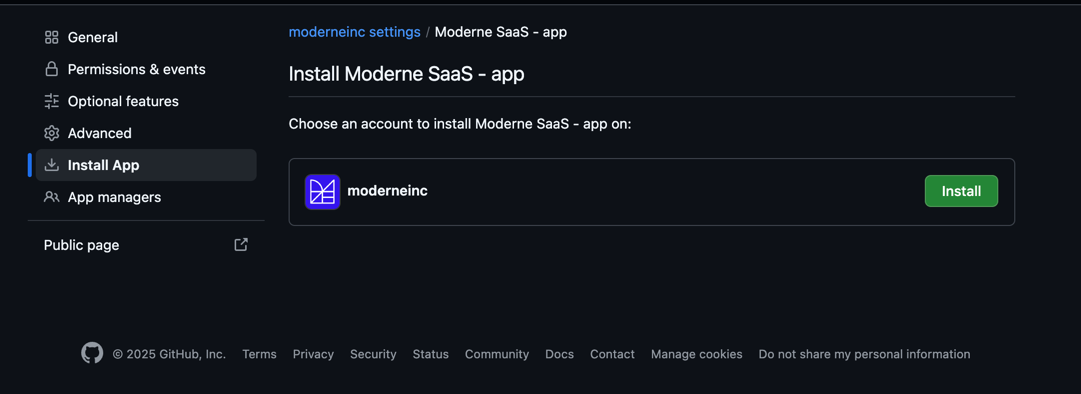
Click Install next to the account where you want to enable the app.
Selecting repository access
During installation, you can choose which repositories the GitHub App can access:
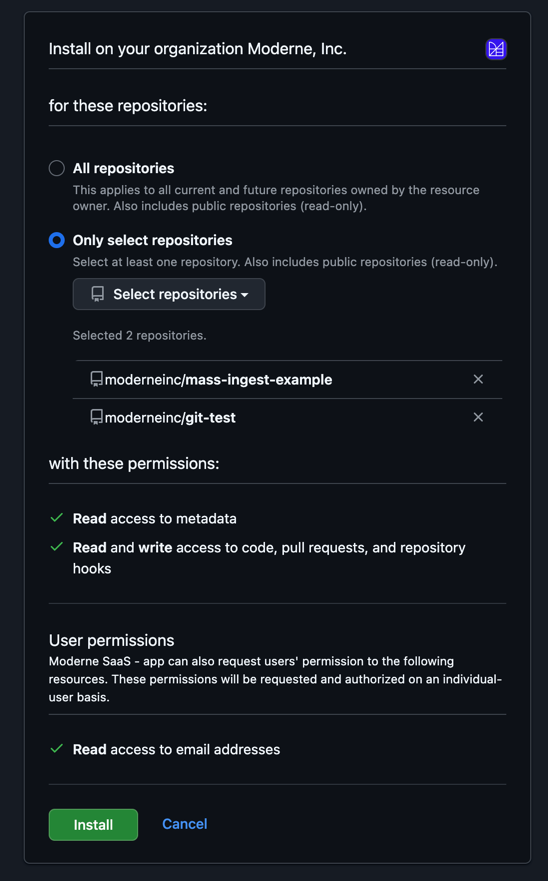
- All repositories: The app will have access to all current and future repositories in the organization.
- Only select repositories: Limit the app to specific repositories. This is optional and provides tighter control, but requires updating the installation when new repositories need access.
GitHub OAuth App permissions
Moderne requires a select number of OAuth scopes necessary to help you transform your code.
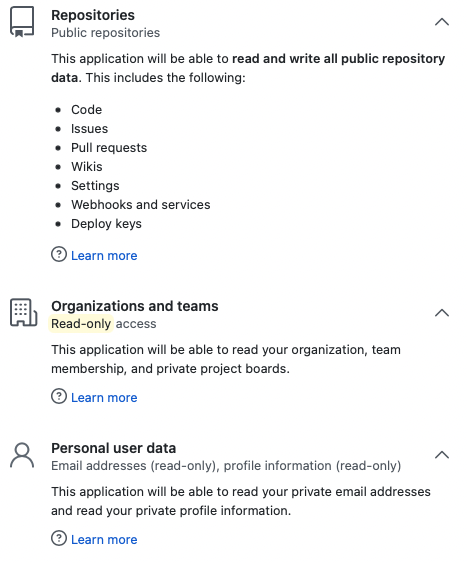
| Permission | Access | Description |
|---|---|---|
| Repositories (public) | Read/write | Create branches, create forks of public repositories, and push changesets on your behalf. |
| Repositories (private) (optional) | Read/write | Create branches, create forks of private repositories, and push changesets on your behalf. Only enabled if include-private-repos=true is set in Connector configuration for GitHub. See configure a Connector with github for more detail. |
| Organizations and teams | Read-only | Understand the organizations you belong to and your level of access within them. |
| Workflow | Read/write | Recipes that alter GitHub Action workflow files require this permission to make commits to them. |
| Personal user data | Read-only | Recognize your account as a new or returning user. Email and Profile are included by default with OpenID Connect through OAuth. |
Detailed list of GitHub API calls Moderne makes
User identity (uses read:user and user:email scopes / Email Address permission):
| API endpoint | Method | Purpose |
|---|---|---|
/user | GET | Retrieve the authenticated user's profile |
/user/emails | GET | Retrieve the user's email addresses |
/user/orgs | GET | List the user's organization memberships |
Repository access checks (uses repo or public_repo scope / Contents permission):
| API endpoint | Method | Purpose |
|---|---|---|
GraphQL repository(owner, name) { isPrivate, viewerPermission } | POST | Batch-verify that the user has access to repositories |
/orgs/{org} | GET | Check whether an organization exists |
/repos/{org}/{repo} | GET | Retrieve repository metadata |
/repos/{org}/{repo}/git/refs/heads/{branch} | GET | Check whether a branch exists |
Pull request operations (uses repo or public_repo scope / Pull Requests permission):
| API endpoint | Method | Purpose |
|---|---|---|
/repos/{org}/{repo}/pulls?base={branch}&state=all | GET | Find existing pull request |
/repos/{org}/{repo}/pulls | POST | Create pull request |
/repos/{org}/{repo}/pulls/{number} | PATCH | Update or close pull request |
/repos/{org}/{repo}/pulls/{number}/merge | PUT | Merge pull request |
/repos/{org}/{repo}/pulls/{number}/reviews | POST | Approve pull request |
GraphQL EnablePullRequestAutoMerge | POST | Enable auto-merge on pull request |
GraphQL pullRequest { reviewDecision, statusCheckRollup, mergeable, ... } | POST | Get pull request status and CI state |
Fork and branch operations (uses repo or public_repo scope / Contents permission):
| API endpoint | Method | Purpose |
|---|---|---|
/repos/{org}/{repo}/forks | POST | Create fork |
/repos/{org}/{repo}/git/refs/heads/{branch} | DELETE | Delete branch |
The OAuth token is scoped to the individual user who authorizes it — Moderne can only perform actions that the user already has permission to do. The token does not grant Moderne any additional access beyond what the user themselves can do in GitHub.
GitHub applications vs. GitHub OAuth applications
We recommend using GitHub Apps, which align with GitHub's best practices. GitHub Apps provide several significant security advantages over OAuth Apps:
- Explicit installation scope: GitHub Apps must be explicitly installed on an Enterprise account or organization, limiting access to only the contexts where they've been approved. OAuth Apps, by contrast, inherit access to all repositories a user can reach once authorized.
- Fine-grained permissions: GitHub Apps allow you to request only the specific permissions needed (e.g., read/write to repository contents, pull requests). OAuth Apps require broader permission scopes that often grant more access than necessary.
- Short-lived tokens: GitHub Apps use user access tokens that expire after 8 hours and are automatically refreshed. OAuth Apps use long-lived tokens that remain valid until explicitly revoked (which Moderne does after 90 days).
- IP allow list compatibility: For organizations that already use IP restrictions, GitHub Apps can declare their IP addresses to avoid being blocked. OAuth Apps do not support this.
That being said, GitHub Apps require installation by an admin/owner in every context where they'll be used. This can create administrative overhead in certain scenarios.
For example, you might prefer a GitHub OAuth application instead if:
- You support personal forks: Each individual user would need to install the GitHub App in their personal account (not just in organizations they belong to).
- You have many independent organizations: An admin would need to install the GitHub App in every organization where Moderne will make changes.
- Pro-tip: Installing the GitHub App at the enterprise level automatically makes it available to all member organizations.
- Installation overhead is too high: The administrative burden of installing across multiple contexts may not be practical for your setup.
OAuth Apps require only user authorization (no installation), but they have broader permissions and access all repositories a user can reach.
Configuring IP allow lists
If your organization uses an IP allow list, you can configure the GitHub App to work within those restrictions.
GitHub App IP allow lists only work when your organization has IP restrictions enabled. This feature allows GitHub Apps to bypass org-wide IP restrictions by declaring trusted IPs - it does not restrict the GitHub App independently. If your organization doesn't use IP allow lists, this configuration has no effect.
Step 1: Configure the GitHub App's IP allow list
In the GitHub App settings under General, scroll to the bottom to find the IP allow list section:
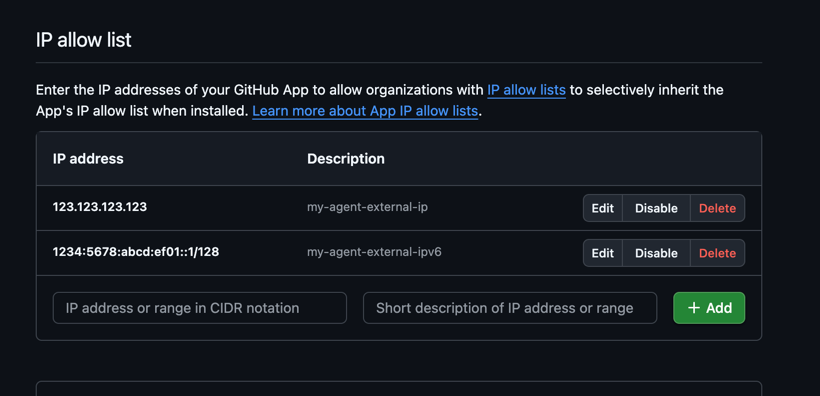
Add the IP addresses of your Moderne Connector deployment. Include both IPv4 and IPv6 addresses if your infrastructure uses both, as GitHub is gradually rolling out IPv6 support.
Step 2: Enable IP allow list inheritance in your organization
In your GitHub organization settings, navigate to Security > Authentication security and ensure both options are enabled:
- Enable IP allow list - Activates IP restrictions for your organization
- Enable IP allow list configuration for installed GitHub Apps - Allows your organization to automatically trust the IP addresses configured by installed GitHub Apps
Both settings are required for the GitHub App's IP configuration to take effect.