Creating a DevCenter recipe
Moderne DevCenters are defined and configured via a standard OpenRewrite recipe. Each card in the DevCenter comes from a recipe in its recipe list, so you can track anything a recipe can measure.
In this doc, we'll walk you through how to create a DevCenter recipe and deploy it to your tenant. By the end, you should be ready to configure a recipe-based DevCenter in your tenant.
Prerequisites
This guide assumes that you have:
- Already configured an organizational structure
- A basic understanding of what declarative YAML recipes look like and how to work with them.
Creating and deploying a DevCenter recipe
Step 1: Create a new recipe repository
The first thing you need to do is to create a new recipe repository using either the rewrite-recipe-starter or your own internal recipe starter template. This repository is where you'll create all of the DevCenter recipes you'd like to use.
Step 2: Add the rewrite-devcenter dependency
Once you've created your recipe repository, you will need to update your build.gradle or pom.xml file to include a dependency on io.moderne.recipe:rewrite-devcenter. This will give you access to key components you need to create and run DevCenter recipes.
rewrite-devcenter is a Moderne proprietary recipe published under io.moderne.recipe in the Code Genome Project repository. Resolve it through your internal artifact repository, which mirrors the Code Genome Project repository, rather than reaching that URL directly from your build.
Because it is a proprietary recipe, the credentials your organization uses to mirror the Code Genome Project repository must have the customer entitlement.
See Accessing the Code Genome Project for how your organization obtains credentials and mirrors the repository.
Step 3: Create a declarative DevCenter recipe
We've provided a devcenter-starter recipe that you can copy to your own repository to get started. You can also create your own if you desire. Check out the understanding DevCenter recipes section below for more information on how to create your own.
The rewrite-devcenter repository contains common card recipes that you may want to use or modify, such as the LibraryUpgrade card recipe. See Card recipes below for an overview.
Any recipe that meets the following requirements can be displayed as a DevCenter card:
- Requires no input options
- Outputs the
UpgradesAndMigrationsand/orSecurityIssuesdata tables (either or both) - Includes the correct columns for those tables (see the data table definitions for details)
Step 4: Deploy the recipe artifact
Once you're satisfied with your recipe(s), you will need to deploy them to your tenant.
Understanding DevCenter recipes
In order to help you get a better understanding of how DevCenter recipes work, let's walk through the DevCenter starter recipe. By the end, you should have a good idea of what makes up a DevCenter recipe and how you can create your own.
Metadata
The top of this recipe begins with standard metadata (e.g., name and description) that you would find in any declarative YAML recipe:
type: specs.openrewrite.org/v1beta/recipe
name: io.moderne.devcenter.DevCenterStarter
displayName: DevCenter Starter
description: |-
  A starting point for your own DevCenter, combining upgrades, migrations, and security fixes.
  Run it as-is for a first overview of your organization, then copy and customize the configuration.
Recipe list
After that, it lists out the recipes that will be run to build the DevCenter dashboard. Most of these recipes will turn into a card in your DevCenter:
recipeList:
  - io.moderne.devcenter.LibraryUpgrade:
      cardName: Move to Spring Boot 4.1
      groupIdPattern: org.springframework.boot
      artifactIdPattern: '*'
      version: 4.1.0
      upgradeRecipe: io.moderne.java.spring.boot4.UpgradeSpringBoot_4_1
  - io.moderne.devcenter.JavaVersionUpgrade:
      majorVersion: 25
      upgradeRecipe: org.openrewrite.java.migrate.UpgradeToJava25
  - io.moderne.devcenter.JUnitJupiterUpgrade:
      upgradeRecipe: org.openrewrite.java.testing.junit6.JUnit5to6Migration
  - io.moderne.devcenter.SecurityStarter
  - io.moderne.devcenter.FindOrganizationStatistics
  - io.moderne.devcenter.FindActiveCommitters
DevCenter recipes have two notable properties worth calling out:
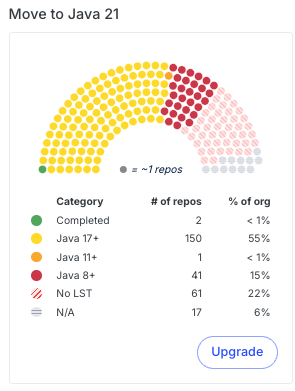
cardNameis a property that allows you to customize what the name of the card should be. Not all recipes have acardNameproperty. For instance, the LibraryUpgrade recipe has acardNameproperty – whereas the JavaVersionUpgrade recipe does not.upgradeRecipeis a property that defines the recipe that should be run to upgrade your repositories. It is the recipe that will get executed when you press theUpgradebutton on a card. OnPackageMigrationcards, this property is calledmigrationRecipe.
Organizational ownership recipes
The last two recipes in the list, io.moderne.devcenter.FindOrganizationStatistics and io.moderne.devcenter.FindActiveCommitters, do not produce cards. They populate the Lines of code and Contributing developers cards in the DevCenter's Organizational ownership section. Include both in every DevCenter recipe. Without them, those two cards remain empty. The canonical recipe list that includes both is the DevCenterStarter recipe.
If your DevCenter recipe lists org.openrewrite.search.FindCommitters, replace it with io.moderne.devcenter.FindActiveCommitters. FindCommitters counts everyone who ever committed to a repository, which inflates the Contributing developers card. FindActiveCommitters only counts committers from the last 90 days.
Security card
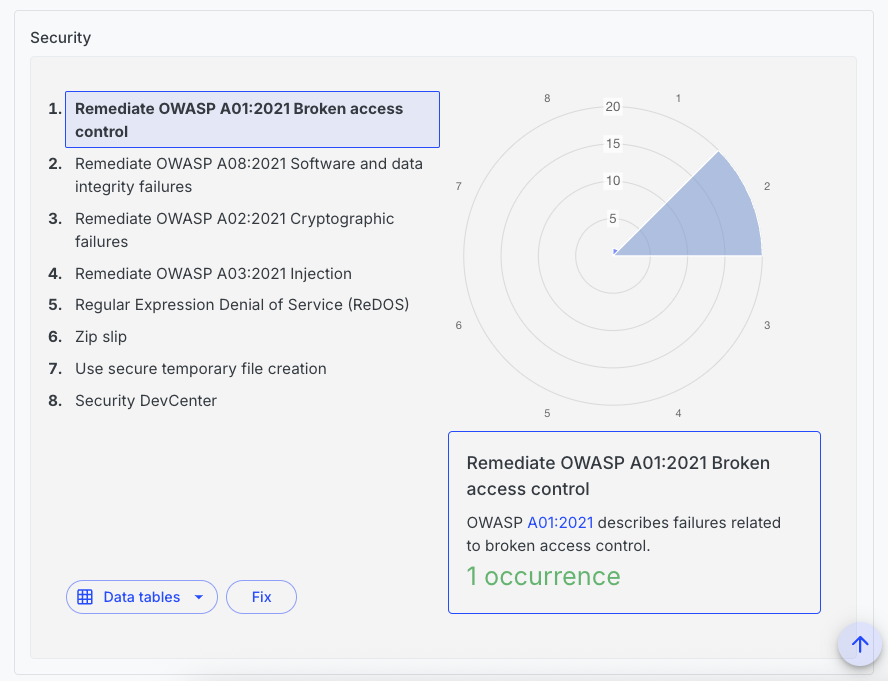
You can also define recipes in the same YAML file as your DevCenter recipe. For instance, the starter file defines the SecurityStarter recipe that creates a security card in the DevCenter:
---
type: specs.openrewrite.org/v1beta/recipe
name: io.moderne.devcenter.SecurityStarter
displayName: OWASP top ten
description: >-
  This recipe is a starter card to reveal common OWASP Top 10 issues in your source code.
  You can customize this configuration to suit your needs.
recipeList:
  - org.openrewrite.java.security.OwaspA01
  - org.openrewrite.java.security.OwaspA02
  - org.openrewrite.java.security.OwaspA03
  - org.openrewrite.java.security.OwaspA08
  # Changes made by recipes above this one in the recipe list are reported as occurrences
  # in the Security DevCenter card.
  - io.moderne.devcenter.ReportAsSecurityIssues:
      fixRecipe: org.openrewrite.java.security.OwaspTopTen
This security recipe differs slightly from a traditional YAML recipe. In the recipe list, there is a special recipe called io.moderne.devcenter.ReportAsSecurityIssues. By adding that recipe to the list, it will detect the number of issues found in the above recipes and generate a card that displays them all.
This recipe takes in a fixRecipe property that defines the recipe that can be run to fix the issues reported by the above security recipes.
Card recipes
The following card recipes are among the most commonly used. Each one places every repository in a category, such as how far it is from a target version, and the card shows how many repositories fall in each category.
| Card recipe | What the card tracks |
|---|---|
LibraryUpgrade | The lowest version of the matching Maven or Gradle dependencies, compared to a target version. |
ParentPomUpgrade | The version of a Maven parent POM, compared to a target version. |
PackageUpgrade | The version of an npm, PyPI, or NuGet package or a Go module, compared to a target version. |
PackageMigration | Whether repositories have moved from one npm, PyPI, or NuGet package or Go module to another. |
JavaVersionUpgrade | The Java version each repository compiles for. |
JUnitJupiterUpgrade | Whether each repository tests with JUnit 4, JUnit 5, or JUnit 6. |
BuildToolCard | The Gradle or Maven version each repository builds with. |
DependencyVulnerabilityCheck | Known dependency vulnerabilities, measured by severity, by the size of the upgrade that fixes them, or by risk score. |
BucketedMetricCard | A numeric column from a data table that an earlier recipe in the list produces, aggregated per repository and sorted into the categories you define. |
EcmaScriptModernization | How many JavaScript and TypeScript variable declarations still use var. |
ReportAsSecurityIssues | Issues found by the recipes listed before it, shown in the security section. |
There are also version cards for other languages and frameworks:
AngularVersionUpgradeCSharpVersionUpgradeGoVersionUpgradeGroovyVersionUpgradeKotlinVersionUpgradeNodeVersionUpgradePythonVersionUpgradeScalaVersionUpgrade
The rewrite-devcenter repository has the complete set, including card recipes and DevCenters added after this guide was written.
More DevCenter recipe examples
Besides the starter, rewrite-devcenter ships complete DevCenter recipes that you can deploy as they are or copy as a starting point:
- DevCenter for Quarkus
- DevCenter for Apache and DevCenter for Apache Maven
- DevCenter for Gradle and Maven
- DevCenter for Vulnerability Management
- Class cohesion DevCenter
- DevCenters for Angular, C#, Go, JavaScript and TypeScript, Kotlin, Python, and React
The following examples, taken from those recipes, show how you can customize a DevCenter to meet your own needs.
Quarkus example
The DevCenter for Quarkus recipe:
- Points the
LibraryUpgraderecipe atio.quarkusdependencies instead oforg.springframework.boot. - Uses a
ParentPomUpgraderecipe to track the Quarkus Universe BOM parent POM. - Defines its own
UpgradeQuarkusUniverseBomrecipe to upgrade that parent POM, as no such recipe exists elsewhere.
type: specs.openrewrite.org/v1beta/recipe
name: io.moderne.devcenter.QuarkusDevCenter
displayName: DevCenter for Quarkus
description: >-
  A DevCenter that tracks the latest Quarkus framework versions and applies best practices.
recipeList:
  - io.moderne.devcenter.FindOrganizationStatistics
  - io.moderne.devcenter.FindActiveCommitters
  - io.moderne.devcenter.LibraryUpgrade:
      cardName: Move to Quarkus 4.0
      groupIdPattern: io.quarkus
      artifactIdPattern: quarkus-*
      version: 4.0.x
      upgradeRecipe: org.openrewrite.quarkus.MigrateToQuarkus_v4_0_0
  - io.moderne.devcenter.ParentPomUpgrade:
      cardName: Move to the latest Quarkus Universe BOM
      groupIdPattern: io.quarkus
      artifactIdPattern: quarkus-universe-bom
      version: 4.0.x
      upgradeRecipe: io.moderne.devcenter.UpgradeQuarkusUniverseBom
  - io.moderne.devcenter.JavaVersionUpgrade:
      majorVersion: 25
      upgradeRecipe: org.openrewrite.java.migrate.UpgradeToJava25
  - io.moderne.devcenter.SecurityStarter
---
type: specs.openrewrite.org/v1beta/recipe
name: io.moderne.devcenter.UpgradeQuarkusUniverseBom
displayName: Upgrade Quarkus Universe BOM
description: >-
  Upgrades the Quarkus Universe BOM parent to the latest version.
recipeList:
  - org.openrewrite.maven.UpgradeParentVersion:
      groupId: io.quarkus
      artifactId: quarkus-universe-bom
      newVersion: x
Additional recipes do not have to be in the same file or even the same module.
Custom parent example
The DevCenter for Apache recipe:
- Uses a
ParentPomUpgraderecipe to track the Apache parent POM instead of aLibraryUpgraderecipe. - Defines its own
UpgradeApacheParentrecipe that specifies thegroupIdandartifactIdof the parent POM to upgrade.
type: specs.openrewrite.org/v1beta/recipe
name: io.moderne.devcenter.ApacheDevCenter
displayName: DevCenter for Apache
description: >-
  A DevCenter that tracks the latest Apache parent POM version and applies best practices.
recipeList:
  - io.moderne.devcenter.FindOrganizationStatistics
  - io.moderne.devcenter.FindActiveCommitters
  - io.moderne.devcenter.ParentPomUpgrade:
      cardName: Move to the latest `apache` parent POM
      groupIdPattern: org.apache
      artifactIdPattern: apache
      version: 40
      upgradeRecipe: io.moderne.devcenter.UpgradeApacheParent
  - io.moderne.devcenter.JavaVersionUpgrade:
      majorVersion: 25
      upgradeRecipe: org.openrewrite.java.migrate.UpgradeToJava25
  - io.moderne.devcenter.JUnitJupiterUpgrade:
      upgradeRecipe: org.openrewrite.java.testing.junit6.JUnit5to6Migration
  - io.moderne.devcenter.SecurityStarter
---
type: specs.openrewrite.org/v1beta/recipe
name: io.moderne.devcenter.UpgradeApacheParent
displayName: Upgrade Apache Parent POM
description: >-
  Upgrades the Apache parent POM to the latest version.
recipeList:
  - org.openrewrite.maven.UpgradeParentVersion:
      groupId: org.apache
      artifactId: apache
      newVersion: x