Configure a Connector with generic HTTP tools for use in recipes
You have internal services within your enterprise that you may want to use within your recipes. Some possible examples follow:
- Launch Darkly - I want to use a recipe to identify code paths that can no longer be hit due to a Launch Darkly flag that has been turned on for a long time.
- Security advisory database - I have a security advisory database internally, and I want to use a recipe to identify when my dependencies match a security advisory in my internal database.
- NPM registries - I want to run a recipe that reads package metadata from a private npm registry.
Setting up a generic HTTP tool will allow you to use org.openrewrite.ipc.http.HttpSender from your internal recipes to call tools inside your environment. Example usage of HttpSender.
NodeJS dependency recipes no longer run npm install. Lock files are regenerated by an in-process engine in rewrite-javascript that reads package metadata from the registry over HTTP, and org.openrewrite.nodejs.NpmExecutor has been removed. Registries and credentials are now supplied through org.openrewrite.javascript.NodeExecutionContextView, or discovered from .npmrc, .yarnrc.yml, and pnpm configuration in the repository.
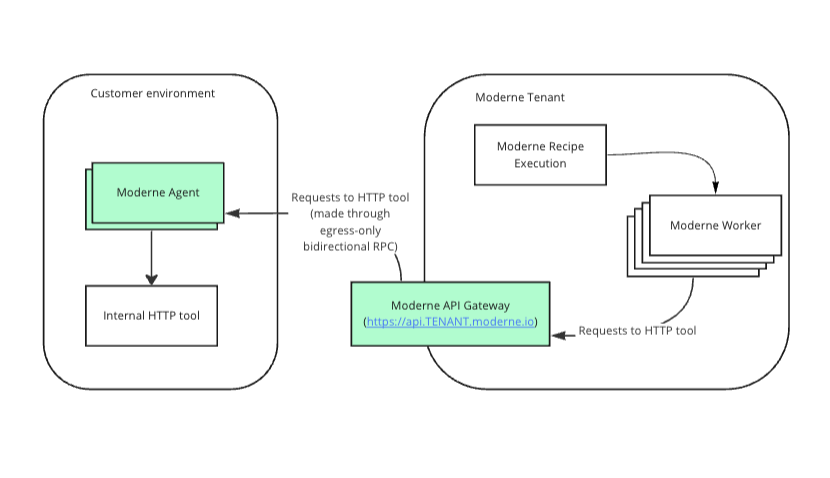
Connector configuration
The following table contains all the variables/arguments you need to add to your Moderne Connector run command to work with your HTTP tool. Please note that these variables/arguments must be combined with ones found in other steps in the Configuring the Moderne Connector guide.
You can configure multiple generic HTTP tools by including multiple entries, each with a different {index}.
- OCI Container
- Executable JAR
Environment variables:
| Variable Name | Required | Default | Description |
|---|---|---|---|
MODERNE_CONNECTOR_HTTPTOOL_{index}_URI | true | Fully qualified URL to your HTTP tool. | |
MODERNE_CONNECTOR_HTTPTOOL_{index}_USERNAME | false | Username used to authenticate to HTTP tool. Note: Only one of basic auth (username+password) and bearer token can be used. If username and password are specified, bearer-token must not be provided. | |
MODERNE_CONNECTOR_HTTPTOOL_{index}_PASSWORD | false | Password used to authenticate to HTTP tool. Note: Only one of basic auth (username+password) and bearer token can be used. If username and password are specified, bearer-token must not be provided. | |
MODERNE_CONNECTOR_HTTPTOOL_{index}_BEARERTOKEN | false | Bearer token used to authenticate to HTTP tool. Note: Only one of basic auth (username+password) and bearer token can be used. If bearer-token is specified, username and password must not be provided. | |
MODERNE_CONNECTOR_HTTPTOOL_{index}_SKIPSSL | false | false | Specifies whether or not to skip SSL validation for HTTP connections to this HTTP tool. This must be set to true if you use a self-signed SSL/TLS certificate. |
MODERNE_CONNECTOR_HTTPTOOL_{index}_SKIPVALIDATECONNECTIVITY | false | false | By default, on Connector startup, we will validate that we can connect to this HTTP tool, and fail to start up the Connector if we cannot. Set this to true to skip this validation. |
MODERNE_CONNECTOR_HTTPTOOL_{index}_PROXY_HOST | false | The hostname of a proxy server to use for connections to this HTTP tool. | |
MODERNE_CONNECTOR_HTTPTOOL_{index}_PROXY_PORT | false | The port of the proxy server to use for connections to this HTTP tool. | |
MODERNE_CONNECTOR_HTTPTOOL_{index}_CONNECTTIMEOUT | false | 30s | Timeout for the connection to be established (and the first data received). Specified as a duration (e.g., 30s, 1m). |
MODERNE_CONNECTOR_HTTPTOOL_{index}_READTIMEOUT | false | 60s | Timeout for reading the response body from the HTTP tool. Specified as a duration (e.g., 60s, 5m). |
Example:
docker run \
# ... Existing variables
-e MODERNE_CONNECTOR_HTTPTOOL_0_URI=https://launchdarkly.mycompany.com \
-e MODERNE_CONNECTOR_HTTPTOOL_0_USERNAME=myUser \
-e MODERNE_CONNECTOR_HTTPTOOL_0_PASSWORD=${SECRET_NAME} \
# ... Additional variables
Arguments:
| Argument Name | Required | Default | Description |
|---|---|---|---|
--moderne.connector.http-tool[{index}].uri | true | Fully qualified URL to your HTTP tool. | |
--moderne.connector.http-tool[{index}].username | false | Username used to authenticate to HTTP tool. Note: Only one of basic auth (username+password) and bearer token can be used. If username and password are specified, bearer-token must not be provided. | |
--moderne.connector.http-tool[{index}].password | false | Password used to authenticate to HTTP tool. Note: Only one of basic auth (username+password) and bearer token can be used. If username and password are specified, bearer-token must not be provided. | |
--moderne.connector.http-tool[{index}].bearer-token | false | Bearer token used to authenticate to HTTP tool. Note: Only one of basic auth (username+password) and bearer token can be used. If bearer-token is specified, username and password must not be provided. | |
--moderne.connector.http-tool[{index}].skip-ssl | false | false | Specifies whether or not to skip SSL validation for HTTP connections to this HTTP tool. This must be set to true if you use a self-signed SSL/TLS certificate. |
--moderne.connector.http-tool[{index}].skip-validate-connectivity | false | false | By default, on Connector startup, we will validate that we can connect to this HTTP tool, and fail to start up the Connector if we cannot. Set this to true to skip this validation. |
--moderne.connector.http-tool[{index}].proxy.host | false | The hostname of a proxy server to use for connections to this HTTP tool. | |
--moderne.connector.http-tool[{index}].proxy.port | false | The port of the proxy server to use for connections to this HTTP tool. | |
--moderne.connector.http-tool[{index}].connect-timeout | false | 30s | Timeout for the connection to be established (and the first data received). Specified as a duration (e.g., 30s, 1m). |
--moderne.connector.http-tool[{index}].read-timeout | false | 60s | Timeout for reading the response body from the HTTP tool. Specified as a duration (e.g., 60s, 5m). |
Example:
java -jar connector-{version}.jar \
# ... Existing arguments
--moderne.connector.http-tool[0].uri=https://launchdarkly.mycompany.com \
--moderne.connector.http-tool[0].username=myUser \
--moderne.connector.http-tool[0].password=${SECRET_NAME} \
# ... Additional arguments