Configure a Connector to connect to Moderne via an HTTP proxy
If your organization requires an HTTP proxy in order to be able to access the public internet, you can configure this proxy for communication between the Moderne Connector and the Moderne API Gateway.
This proxy will be used for egress, and then the API gateway will establish the Layer 7 connection with the Moderne Connector through which all further communication will pass.
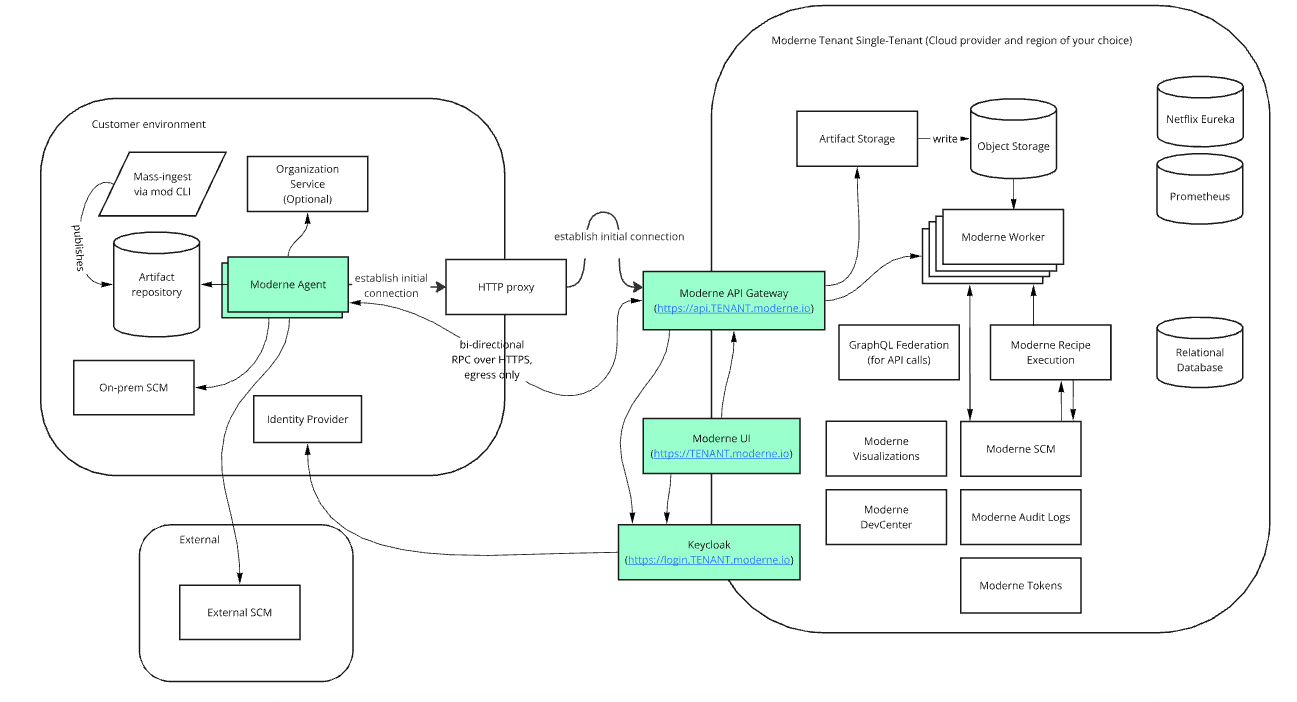
HTTP CONNECT proxy
If your organization uses an HTTP CONNECT proxy for outbound traffic, configure the Connector with the proxy host and port. The following variables/arguments must be combined with ones found in other steps in the Configuring the Moderne Connector guide.
- OCI Container
- Executable JAR
Environment variables:
| Variable Name | Required | Default | Description |
|---|---|---|---|
MODERNE_CONNECTOR_APIGATEWAY_PROXY_HOST | false | Host (without scheme) for the proxy server. | |
MODERNE_CONNECTOR_APIGATEWAY_PROXY_PORT | false | Port for the proxy server. |
If you include either a host or port, you must include both.
Example:
docker run \
# ... Existing variables
-e MODERNE_CONNECTOR_APIGATEWAY_PROXY_HOST=proxy.mycompany.com \
-e MODERNE_CONNECTOR_APIGATEWAY_PROXY_PORT=8179 \
# ... Additional variables
Arguments:
| Argument Name | Required | Default | Description |
|---|---|---|---|
--moderne.connector.api-gateway.proxy.host | false | Host (without scheme) for the proxy server. | |
--moderne.connector.api-gateway.proxy.port | false | Port for the proxy server. |
If you include either a host or port, you must include both.
Example:
java -jar connector-{version}.jar \
# ... Existing arguments
--moderne.connector.api-gateway.proxy.host=proxy.mycompany.com \
--moderne.connector.api-gateway.proxy.port=8179 \
# ... Additional arguments
Per-tool proxies
The proxy described above only governs the Connector's own outbound connection to the Moderne API Gateway. It is not applied to the tools the Connector reaches on your behalf.
Each integration the Connector talks to can be given its own HTTP proxy independently, via proxy.host / proxy.port settings on that tool. This includes:
- SCM instances (GitHub, GitLab, Azure DevOps, Bitbucket Data Center, Bitbucket Cloud)
- Maven and Artifactory repositories
- Recipe marketplace repositories (Maven, npm, NuGet, PyPI)
- Generic HTTP tools
- LLM providers for Moddy
See the Connector configuration variables reference for the exact proxy variable on each tool. As with the API Gateway proxy, if you set a host you must also set the matching port.